Answered
Captivate 9 - Cannot save a cptx in cptl
The cptl file type is no longer available when I open an existing .cptx and do File Save As. This file type was available in Captivate 8. Does anyone have a clue of how I can get this back?

The cptl file type is no longer available when I open an existing .cptx and do File Save As. This file type was available in Captivate 8. Does anyone have a clue of how I can get this back?
I just double-checked in Captivate 9.0.2.437 and do see 'cptl' in the dropdown list with FIle, Save as:
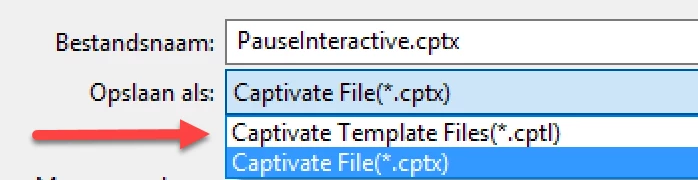
Sorry for the Dutch Windows on this system. 'Bestandsnaam' = File Name. 'Opslaan als' = Save as.
As a side note: I would use cptl-files sparingly, they have issues. If you want to have consistent styling and layout, please create a custom theme to apply to projects instead of a template: What's in a Theme - a Template? - Captivate blog
Already have an account? Login
Enter your E-mail address. We'll send you an e-mail with instructions to reset your password.
 AdChoices