
Inspiring
February 27, 2017
Answered

Captivate 9 drag drop - hide and disable drop targets?

  • February 27, 2017
  • 3 replies
  • 988 views

I'm trying to create a drag-drop with all targets in the same location. I want to hide all targets except one.  Users should drag the correct source to the target, which then follows a motion path with it's source to fall on a stack at the bottom of the screen. The next valid target then becomes visible. Incorrect sources should be rejected.

When the targets are spread out on the stage and all are visible, everything works well. Correct matches follow the motion path and incorrect sources get rejected. However, ALL targets seem to be active even though set to hide and disabled in a slide entry AA. When all targets are superimposed on each other, ALL sources seem to be accepted by the target (the only one visible) and execute my AA to drop down the stage.

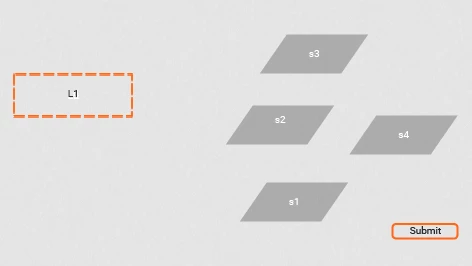
Targets are named l_1, l_2, l_3, l_4 and are superimposed on each other

Sources are named s1, s2, s3, s4

The stage (yes, this is just in test phase at the moment)
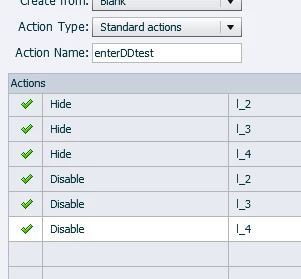
Slide entry AA
Setup for target l_1 (all other targets follow this model)

AA when s1 is dropped on l_1
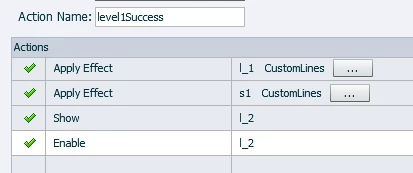
Is there any way to truly disable l_2 so that it does not respond until level1Success executes?

This topic has been closed for replies.
Correct answer dan561

Thanks for the replies. After playing and thinking a bit, I think the easiest solution is to create a separate slide for each target. Since the drop order is defined (this is a simulation of a product assembly in layers), I can just duplicate items as needed. I sometimes think too much like a programmer and make things complicated for myself!

3 replies

dan561AuthorCorrect answer
Inspiring
February 27, 2017

Thanks for the replies. After playing and thinking a bit, I think the easiest solution is to create a separate slide for each target. Since the drop order is defined (this is a simulation of a product assembly in layers), I can just duplicate items as needed. I sometimes think too much like a programmer and make things complicated for myself!

Inspiring
February 27, 2017

Yes, if you don't need to have the whole D&D on one slide, that's much easier of course. I thought you had the need to have it on one slide.

Inspiring
February 27, 2017

In my opinion it is also possible to have overlapping objects in D&D. If you drop a source over more than one object (because they are overlapping) and some of the targets are put on "accept" for the particular source, the source will be accepted by the target with the highest z-order. So if all targets are superimposed on each other, the source will always be accepted (as long as there is at least one target in the stack which accepts the source).

So for your problem: The only solution I know is to make several copies of the sources.

Example (with two sources and two targets): If your initial sources are named source1_1 and source2_1, copy them and name the copies source1_2 and source2_2. If target 2 shall accept the second source, put the accept-condition of target 2 as follows: Accept source2_2 and reject all other sources.

Hide source1_2 and source2_2 at the beginning. After the first source has been successfully dropped, hide source2_1 and show the sources1_2 and 2_2 (for example with an AA or by JS). (Remark: Or only show 2_2 in this example, as the first source had already been accepted). Hide the unused targets with a Smartshape (for example) until they are needed.

Adapt this to your situation (with more than two sources and targets). This is awkward of course, but it works. Maybe somebody knows a better solution. In fact, there is a better solution: Code your own D&D with HTML / JS and import it as web object (or as HTML animation) into Captivate. The D&D options in Captivate are very limited.

Lilybiri
Legend
February 27, 2017

I'm not sure to understand but want to tell that it is NOT possible to have overlapping objects in D&D slides, not for drag sources and not for drop targets.

You also talk about 'enable' which only is possible for interactive objects. Do you mean that the target are buttons? AFAIK it is not possible to have interactive objects as D&D objects? This is from the Captivate Help:

Why do you want to force everything on one slide?