
robertw68188403
Participant
April 26, 2017
Question

Captivate 9 fill in the blank HTML issues

  • April 26, 2017
  • 6 replies
  • 672 views

When publishing a fill-in-the-blank quiz question in responsive, the output looks like this:
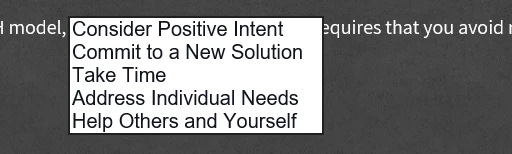
This has two issues:

1. I have to use a black font color in order for the text to show in the drop down. As you can see my question has a dark background with white text, which means the "blank" area in the question is practically impossible to see. 

2. The font in the drop down does not match the font used in the question. It also looks like it's using two different fonts, one in the drop down and another once a choice is selected!

I'm assuming that is because it's HTML5 rather than swf?

Any work around?

    This topic has been closed for replies.

    6 replies

    MichaelStephens
    Legend
    July 18, 2019

    Obviously that's not how it's supposed to work.

    With the file being viewed in HTML, press F12 to bring up the browser developer tools and use the inspector to find both drop-down lists in the HTML code. When you click on the target box for the drop-down the lines of code that change will be highlighted briefly. It will be helpful to write down the z-index to make it easier to compare them. Do that for both boxes and look to see what the z-index is for both boxes when they’re not clicked and then when they are clicked starting with the top box first then the lower box. Then refresh your browser and do the same process again but starting with the lower box first then the top one. Then compare the

    Both boxes will actually have two lines of HTML that change. One line changes the z-index for the main target and the other line is for the options that appear. The image below shows how far down the line for the options box is nested below the target object. (The code for the options list will also change it's display from "none" to "block" when it's visible or not visible)

    For my two fill-in-the-blank options, the z-index for the objects is as follows regardless of which one I click first.

    Default

    Top z-index: 4

    Top options: 1

    Lower z-index: 4

    Lower options: 1

    Top clicked

    Top z-index: 1000

    Top options: 9999

    Lower z-index: 4

    Lower options: 1

    Bottom clicked

    Top z-index: 4

    Top options: 1

    Lower z-index: 1000

    Lower options: 9999

    Participant
    July 18, 2019

    any Idea, when Adobe will fix this issue in captivate (HTML5 output)?

    MichaelStephens
    Legend
    April 28, 2017

    The main part of the problem is because each browser renders a drop-down list slightly differently. The image below shows the same drop-down quiz slide in three different browsers. Firefox and Chrome at least put the drop-down lower than the text to the right and left unlike IE that covers the word ‘and’ in the sentence.

    IE is the browser that shows a different font after you’ve made a selection. You can overcome this issue by adding some CSS to your index.html file that’s created when you publish the project. If you put the following code into the index.html file directly after the top CSS code, you can force every browser to use the font Arial. If it’s not Arial you’re using then just change it to whatever font you are using.

    <style type="text/css">

                    select {

                    font-family: Arial, "sans-serif" !important;

                    }

    </style>

    Here's what it looks like before and after adding the code.

    Participant
    July 18, 2019

    There is one more issue in FIB (drop-down) question for z-index in HTML5 output. if there are multiple drop-down option in the question and 1 by 1 and first select 2nd drop-down and then select the 1st drop-down, the drop-down list goes behind the 2nd drop-down. This problem occurs when drop down are placed on vertically and same position on horizontally.

    MichaelStephens
    Legend
    July 18, 2019

    Can you post a screenshot of the issue?