Participant
November 12, 2015
Question

Captivate 9 - Fill in the Blank- Review Mode

  • November 12, 2015
  • 1 reply
  • 782 views

Hi there,

I have created a quiz that uses the fill in the blank question type. when we do the review after they have done the quiz the review box appears behind the box, I have included a screenshot so you can see.
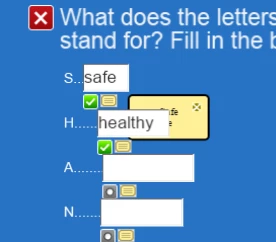
Any ideas on how to get the yellow box to be on top?

Thanks

Jamie

This topic has been closed for replies.

1 reply

November 19, 2015

I have the exact same issue!

Participant
November 19, 2015

I worked round it by modifying the css file 'cplibraryall.css' it is in the asset/css folder. Just unzip the scorm package edit the file and rezip everything.

Modify the selector .sequenceReviewArea, you can change the colours size etc. Also set the z-index to 1000

.sequenceReviewArea{

  background-color: #2773C4;

  display: block;

  color:#fff;

  position: fixed;

  font:arial;

  min-width:75px;

  border: solid 1px;

  font-size: 15px;

  border-radius: 5px;

  border-color: black;

  z-index:1000;

}

Hope this helps you

Thanks

Jamie

November 20, 2015

Thanks Jamie - I will try this and report back.