
[Captivate 9] Formatting answers
I need a quiz that uses random questions from a pool. After a bit of struggle (apparently importing a 100 questions from a GIFT format is a challenge for Captivate) I've managed to get a question pool ready. I also edited a master slide for a multiple answer questions (the only type I will be using in this project). Next, I added 5 Random Question slides.
Now, the result in a preview is somewhat disappointing: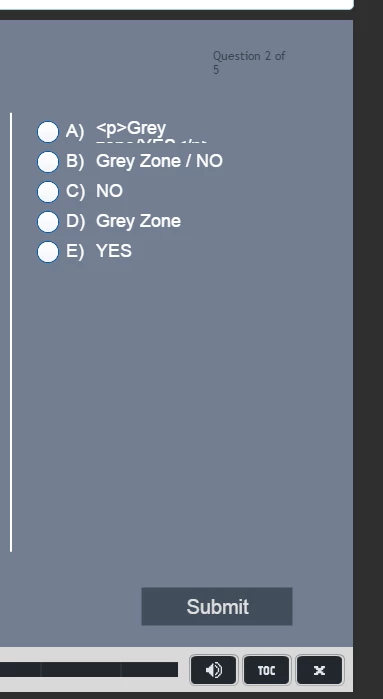
First of all - the progress indicator decided to get a line break for no reason whatsoever. Just because it wants to. And I have absolutely no way to change that - I can't (for some obscure reason, known only to the developers probably) make it's bounding box bigger to allow more space and avoid a line break. Just NO. Lovely.
And then comes the issue of answer formatting - (the <p> tag is not the point here - it's plaintext imported from HTML-based source) - as you can see an answer that doesn't fit into one line does not cause the next answer to move down and is cut in half. Seriously? That's what a "state-of-the-art" software does? Can't handle a simple non-standard layout? Seriously - the issues I come across when working with this program start to be a real pain in the ...back.
So, any hint on how to fix that would be highly appreciated.


 AdChoices