
PixelWire
Participant
April 29, 2016
Question

Captivate 9 - Hightlightbox properties > Fill and Stroke greyed out

  • April 29, 2016
  • 1 reply
  • 287 views

Hi All,

I am currently on Captivate 9 installed with all the latest updates.My issue

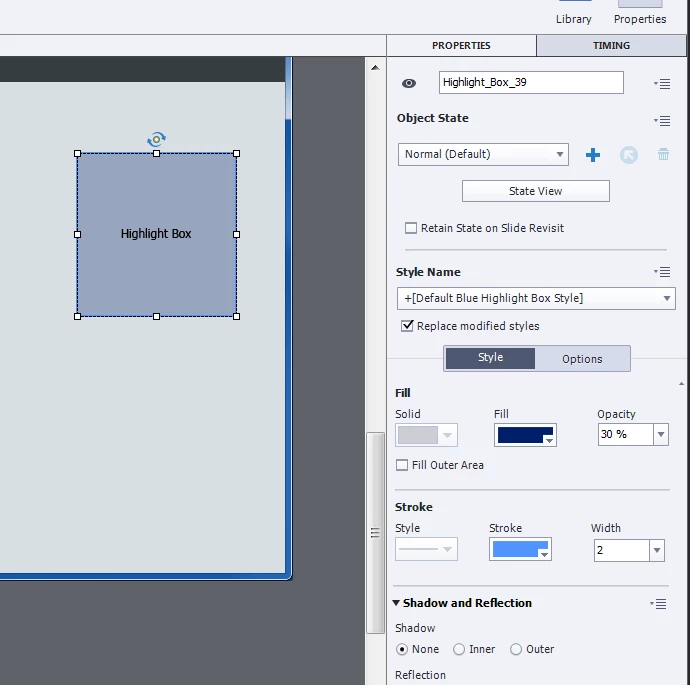
Under the Properties option for Highlight Box, Fill and Stroke options are greyed out. I don't know how to fix this issue. Any help would be welcome?

Here is the image for your reference:
Thanks everyone!

This topic has been closed for replies.

1 reply

Lilybiri
Legend
April 29, 2016

Maybe it is my eyes, but to me both Fill and Stroke look active, not greyed out.

What is greyed out is the choice for Fill: which means you cannot use a texture, nor a gradient, nor an image for the Fill; it has to be always a solid color. But you can choose the color, alpha and indicate if you want the outer area to be filled instead of the inner area.


Bit similar for the Stroke: what is dimmed is the kind of stroke, because dashed stroke is not allowed for a highlight box. But you can choose the color and the stroke width.

Look also in the Object Style Manager, if you want to change the colors, alpha permanently.

bolanabolana
Known Participant
April 29, 2016

Hi

I thought the same when I looked at the image.

Just checked mine and it looked the same as original image added to post, but changed the stroke/fill colour fine!

Thanks

Lilybiri
Legend
April 29, 2016

What is confusing (got some comments about it) is the fact that the Dropdown list which allows to switch between Solid, Gradient and Image is just below the title 'Fill'  (similar for Stroke). The same setup Fill/Stroke is used for shapes and then the first dropdown list is active. Having that first list greyed out doesn't mean that Fill/Stroke are not available, you still can change color, opacity, stroke color and stroke width.