merialatorre7
Participating Frequently
March 28, 2017
Question

Captivate 9: Link to Slide not working - is this a bug?

  • March 28, 2017
  • 2 replies
  • 578 views

Hey everyone!

I've run into an issue and have been looking online for solutions, but haven't been able to find any.

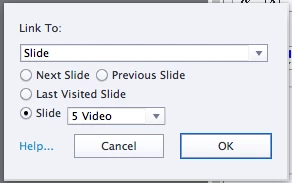
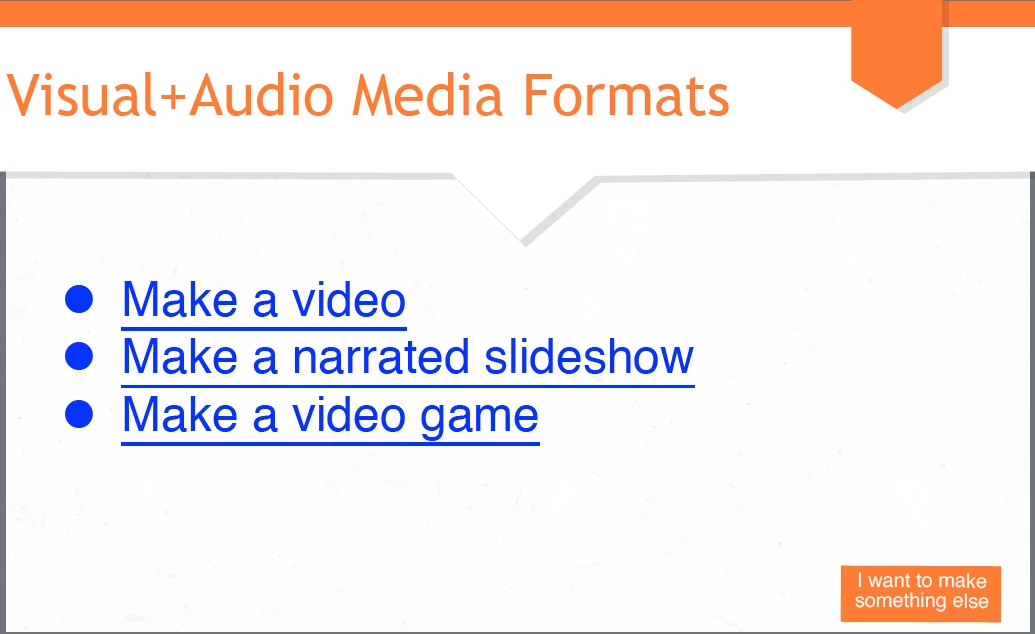
I have hyperlinks in my slides. These links are supposed to go to different slides within the project.

However, when I preview or publish my project and click on the links, they don't go to the correct slide. For example, I will click on "make a video" and it will take me to a completely different slide in my project that isn't even listed on here.

I did duplicate slides when creating my project, but made sure to give each slide an individual name. Any clues as to why this might be happening? Or something I might be missing?
This topic has been closed for replies.

2 replies

faisalimam
Known Participant
May 14, 2017

I am also having this same issue. Normal project, HTML5 output, IE, Chrome, Firefox browsers on Windows 10. The project simply continues when a hyperlink is clicked that was supposed to jump to a slide within the project.

Lilybiri
Legend
March 28, 2017

Hmm, I use that hyperlink feature a lot but never experienced your issues.

More is in a... hyperlink - Dropdown Menu - Captivate blog

You are using the latest version 9.0.2.437? How did you test: if Preview, which method? Is it a normal or a responsive project?

merialatorre7
Participating Frequently
March 28, 2017

Thanks for your response. This is a responsive project.

I have tried:
Preview project
Preview from this slide

I have also tried publishing and testing.

Regardless, still having the same issue.

Lilybiri
Legend
March 28, 2017

OK, this means output to HTML5 and you previewed in Browser. Which browser?

That blog post was with a normal project. I should have to double-check if the links are broken for a responsive project.

Are you using the latest version, please?