Participant
November 30, 2016
Question

Captivate 9 percentages reported do not always match score and pass/fail status is being reported incorrectly

  • November 30, 2016
  • 2 replies
  • 1253 views

We have just discovered that all our courses have been sending inconsistent scores/percentages and pass/fail data to our LMS.

I have tested one of the courses in SCORM cloud and it reported the correct  percentage and pass/fail status.

I have also tested a few of the courses in our LMS's SCORM analyser and observed the correct points being allocated per question, correct score and percentage at the end of the module and correct pass/fail status.

The problem is- the behaviour is inconsistent and therefore difficult to test.

We have run a report from the LMS that shows some instances where two users have gotten the same percentage score, but one has failed and one has passed.

It would appear that this information is coming from captivate, as the pass/fail status and score displayed in the LMS matches those displayed when analysing the user's attempts (see screenshots below)

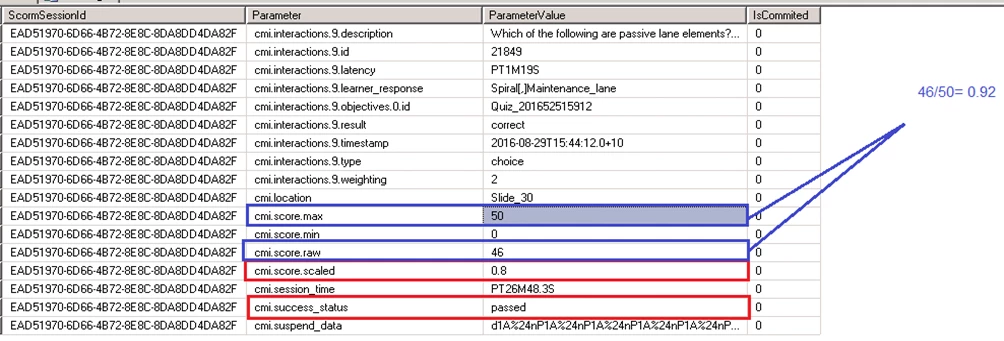
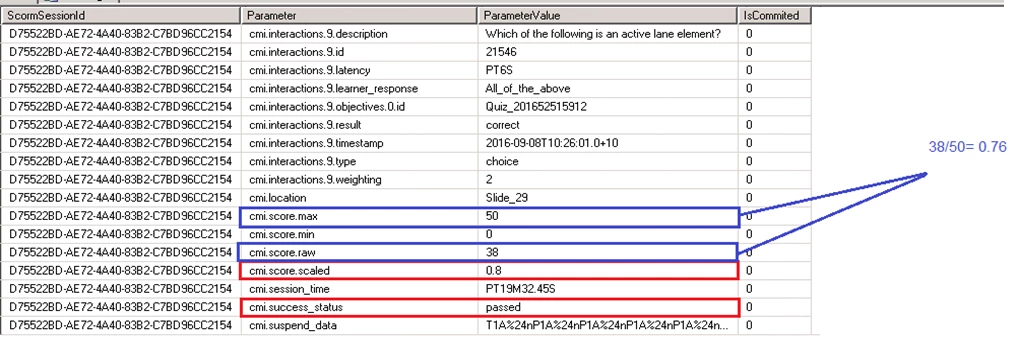
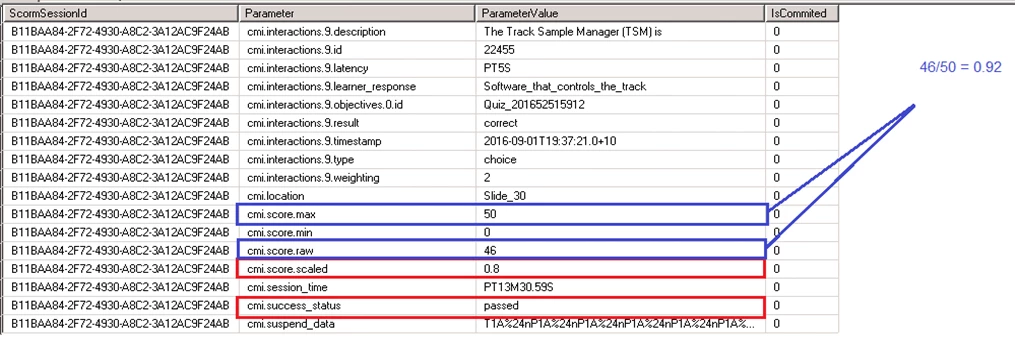
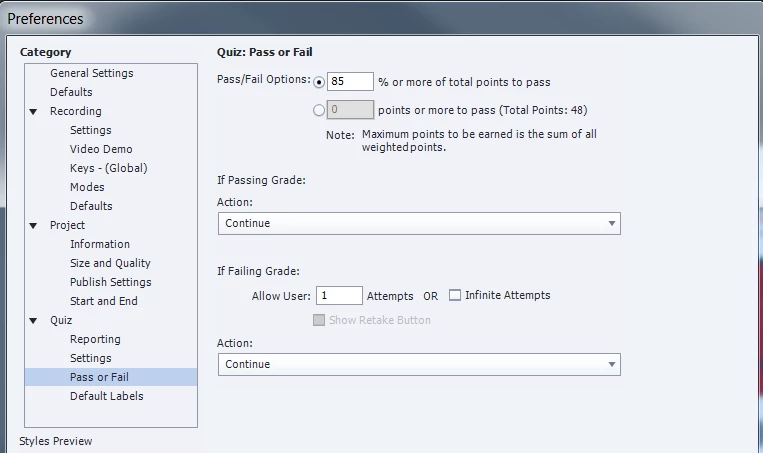
The following screenshots are from a course with a pass ark set as 85%. Four users have achieved a successful result and one an unsuccessful result, despite all reportedly achieving 80%. Upon closer inspection of the score being passed back to the LMS, the percentages are wrong.

User 1 achieved 46/50 = 92% (should have passed and did, but % recorded less than % achieved)

User 2 achieved 38/50 = 76% (should have failed, but was successful - % reported higher than % achieved)

User 3 achieved 46/50 = 92%(should have passed and did, but % recorded less than % achieved)

User 4 achieved 42/40 = 84% (should have failed, and did - % reported less than % achieved)

Report from LMS

Line 1 Data:
Line 2 Data:
Line 3 data:
Line 4 data:
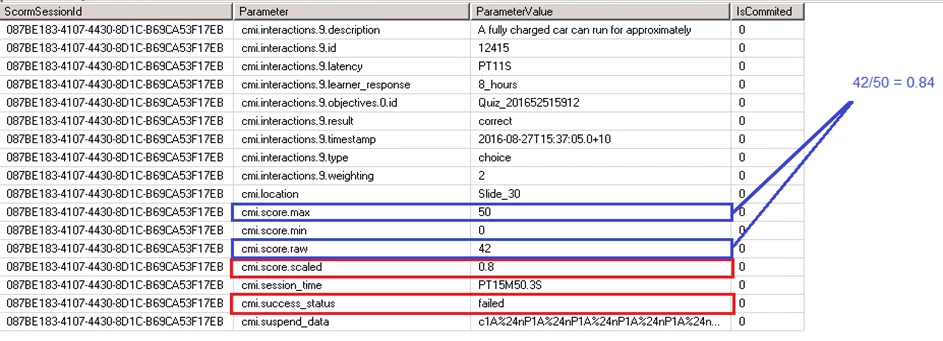
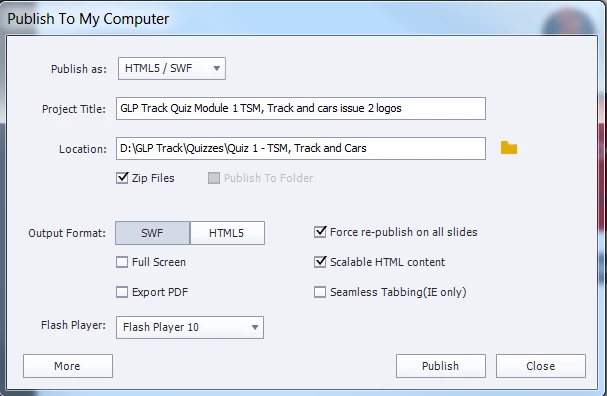
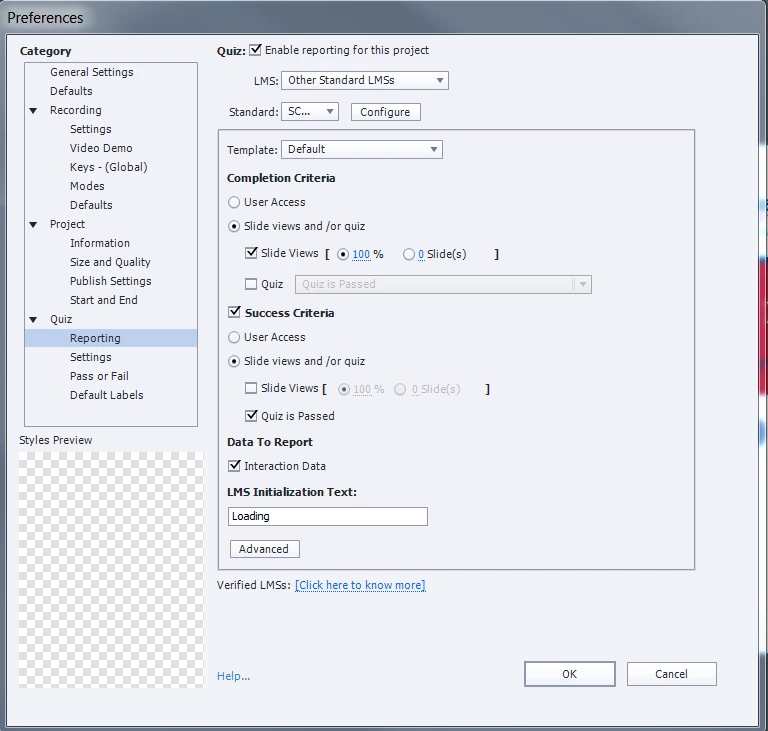
If anyone could shed any light, that would be really helpful. My publish settings are as follows:
This topic has been closed for replies.

2 replies

Lilybiri
Legend
November 30, 2016

Totally agree with Rod about slide %

About the wrong %: did you check Advanced Interaction Panel where you can see the Total score. Maybe you have some scored objects that you didn't want to score besides the Question slides? To detect if the issue is due to Captivate or to the LMS, try uploading the published SCO to SCORM Cloud for testing.

RodWard
Community Expert
Community Expert
November 30, 2016

You currently have Completion Criteria set to require 100% of the slides to be viewed.

Your LMS might be assuming from these settings that even if the person passed the quiz the course should NOT be marked as completed if they did not actually view every single slide in the module.

Try setting this also be Quiz is Passed and see if the consistency gets improved.

Participant
December 8, 2016

Thanks for the suggestion Rod and Lily. Unfortunately when I change the completion criteria to 'quiz is passed', then if the user fails the quiz, it sits in their learning profile as incomplete. I think the settings with completion = 100% slide views and success criteria = quiz is passed was working OK - it just seems to be very intermittently sending the wrong status. I ran a few more reports and found this to only occur 1-5% of the time, so it takes a lot of data to find instances where it is incorrect.

I also checked my advanced interactions panel, but nothing there- my quizzes are pretty straight forward - just questions and no other training / interactive slides.

Any other ideas?

Thanks,

Billie

RodWard
Community Expert
Community Expert
December 9, 2016

Try to make sure your users DO NOT close the project down when they are on the Quiz Results screen.  Make it necessary for them to move BEYOND the quiz results slide to at least ONE more slide before exiting.