
vikrantdangi21
Inspiring
February 27, 2018
Answered

Captivate 9 | Publishing failed | error(s)

  • February 27, 2018
  • 2 replies
  • 4862 views

I am unable to publish my course (SCORM and HTML as well)

I have tried following steps to resolve:

1: Clear the cache

2: Deleted the temp files

3: Created one more copy

4: Changed location of file and publish as well

5: Deleted unused items

6: Tried on different systems

But every time i am getting the same error
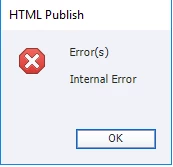
I am facing so many issues with captivate and i had worst experience of my life with this tool. 

This topic has been closed for replies.
Correct answer vikrantdangi21

Hi Lilybiri,

Thanks for your response, i have tried those methods but non of them was working.

But i have tried one other other method (copy all slides in new blank project) and publish is working fine.

But i am still unable to find the exact issue behind this error(Due to lack of time).

2 replies

Participating Frequently
March 1, 2018

This software generates random bugs, it is a poor tool to work with. It looks like this software was not tested properly before releasing. With more customization it generates more bugs. (The placed objects alignment, test size sometimes changes when copy pasting the slide, it lags as hell, etc etc). Even after putting huge efforts for all the views, the files goes corrupt and the solution to the problem are weird .

This tool does fail all the requirements for a rapid tool , its a random bug generator .

I don't think they will ever fix these issues in future updates, since they have released 2017.

RodWard
Community Expert
Community Expert
March 1, 2018

I always find it strange how some people experience nothing but problems with Captivate and come to the conclusion you have (that it's a terrible piece of software) and yet other people seem to find it works fine for them and they love it.

Do you think it's possible there might be OTHER factors at play here besides the programming of the software itself?

Participating Frequently
March 1, 2018

Well Rod, This is not a one day conclusion, I have been working on this responsive tool from like 3 months and still working.

How can you explain bugs which appears randomly in a software? isn't that strange?

If these issues appears without any reasons, It clearly suggests that there is a programming issue in this tool, like this one above.

Piece of cake!!!

Lilybiri
Legend
February 27, 2018

Do you run Captivate as Administrator (if you are on windows)? Are the paths for Publishing and Cache pointing to folders on your system, not on a networked drive?

Are you publishing both to SWF and HTML? If yes, please publish separately, I also had issues since 9 to publish to both at the same time.

Unused items in Library have no connection at all with publishing.

Apparently you didn't clear the Preferences yet. Lookj in the subfolder 'utils' of the installation folder and run the ClearnPereferences file appropriate for your OS, while Captivate is closed.

vikrantdangi21
vikrantdangi21AuthorCorrect answer
Inspiring
February 28, 2018

Hi Lilybiri,

Thanks for your response, i have tried those methods but non of them was working.

But i have tried one other other method (copy all slides in new blank project) and publish is working fine.

But i am still unable to find the exact issue behind this error(Due to lack of time).

Lilybiri
Legend
February 28, 2018

It means that the project was corrupted, can be due to many reasons.Difficult to find te real one. You could have sent the bug report.

On Tue, 27 Feb 2018 at 23:12, vikrantdangi21 <forums_noreply@adobe.com>