
ceadams
Inspiring
September 14, 2017
Answered

Captivate 9 Publishing to LMS Errors

  • September 14, 2017
  • 2 replies
  • 4504 views

Hi.  I hope you can help me.

TIA! 

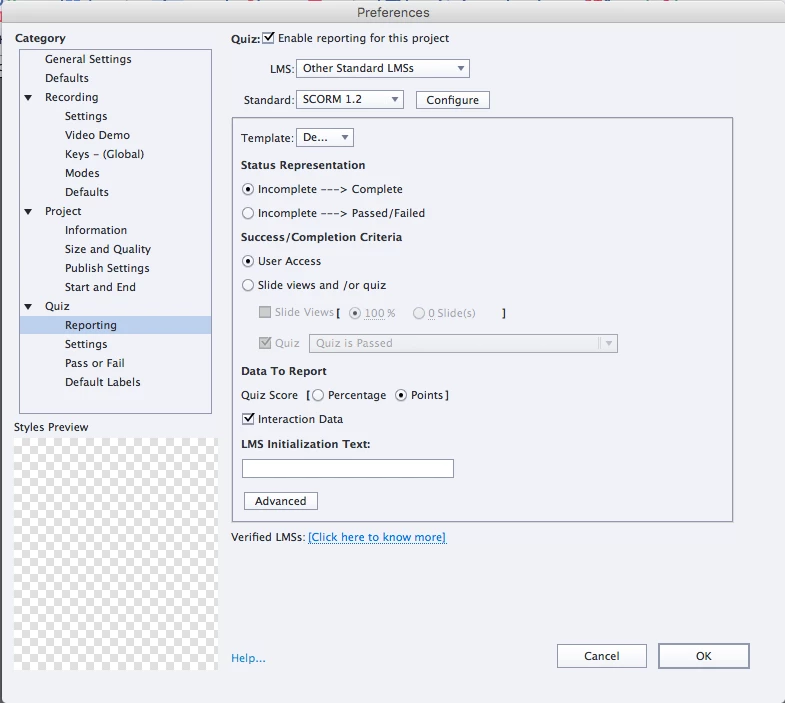
I published a Captivate 9 tutorial to my desktop (zipped file).  I tried this several ways... with reporting disabled (there is no "quiz" in this tutorial; it's just an interactive "chapter highlights" project.  Then I tried it  with reporting enabled selecting SCORM 1.2 and when that didn't work I tried SCORM 2004 (both should be compatible with Canvas (our LMS).

Within Canvas, I navigated to files.  I tried just uploading the zipped folder directly to files... but then when you click on it... it only gives you the option to download it.

So I created a new folder in Files... and then opened that... and clicked upload.  I chose my zipped folder and selected "expand it."  All files uploaded to the new folder.

After everything finished uploading, I clicked on the htm file and received this error:
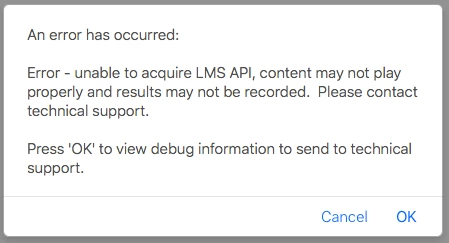
When I hit "OK" a blank screen shows up and nothing happens.  If I try to click the htm again and when the error pops up, click on "cancel...."  Then the tutorial loads and plays in the browser (using Safari).... maybe I should try Chrome...?

Anyway.... I thought all was well... the tutorial seemed to work fine!  ...but the videos I added to the slides are not there... ?!@#! 

What is happening and how do I fix this?

... finally, when I try to play the pdf version... Canvas just spins and spins (little blue circle of death) and never opens the pdf version.... so I'm not sure if the videos play or not.

The video files I added to my project are all mp4's.  They play in the preview mode, but not from the htm file.  They don't show up if I try to play them from Canvas or from my unzipped, "published" folder on my desktop.

I need to get this to work for my professor ASAP!  Please help!  Thank you!

More settings:
This topic has been closed for replies.
Correct answer ceadams

Ceadams,

Joining in late on this discussion - Although, I have also been having issues for the last week uploading SCORM to Canvas! In another forum where I was posting in on Instructure's website, other users reported issues with specifically using Captivate 9 in SCORM over the last week.

I put in a few tickets with Canvas, but haven't gotten any resolution yet. As far as I know, they fixed the issue with publishing the SCORM content using Articulate, but not Captivate. When I upload files to the SCORM tab, I usually get the "404 not found" error.

If the quiz questions do not need to be recorded in the gradebook, you could just upload the package as a zip file to the "Files" tab. Canvas will prompt you to unzip it there, once uploaded. Then, you can post a link to the "index.html" file and the students should be able to view the presentation as long as the whole folder is "published." At the very least, you should be able to use the full functionality of the swf/html5 file, minus the ability to pass grades into the gradebook.

I would also recommend having the file open in a new tab since Canvas gives you a fairly small viewing window if you open it on their default page.


Hi, Sepyle....good to have you!

... I wanted to post an update on this sitch for everyone too....

That's good to know that I'm not the only one that thinks Canvas sucks.    Seriously... though... I'm glad the issue isn't "all my fault."    ... What's weird is our University doesn't even have a "scorm" tab... I think we can "get scorm" enabled for Canvas... but there's this whole "process...."  I don't think our institution is utilizing the feature right now... but hopefully they will in the future.  Right now... the reporting isn't needed for what I need.  I created an interactive tutorial to supplement a series of chapters (one tutorial for each of about 5 chapters) on Learning Design principles.... and now I'm trying to publish the 1st on Canvas so my professor can utilize it.

Lilibiri told me to publish as HTML5... (I didn't before bc I thought it wouldn't support roll overs but Lilibiri said that's only true for mobil and not laptops... so I was glad that got cleared up.  So .... I republished as HTML5 and SWF.  I uploaded the zipped file to Canvas Files... and into a new folder.  Then I selected "unzip" the files when finished.... everything loaded.  If I click the SWF file, everything plays but the videos (blank space where videos should be).  If I click on the index_HTML file in Canvas... that opens and the videos play perfectly as they should!  --so issue resolved.  I'm still not certain why the SWF won't play... I have Flash 11 and set the CP file to open with Flash 10... so IDK>.... but I'm just glad the HTML5 works now.

I have a new question though... no matter what file I try to open... the SWF or HTML.... I get that error code I pasted above: the "unable to acquire LMS API" one... If I hit "OK" nothing happens.  (blank white screen).  If I hit "cancel" the tutorial loads and works perfect... (except for missing videos in the SWF version).... HTML version plays fine.

I would like to get rid of this error code so it doesn't confuse learners if possible.  Any ideas?

--also... you mentioned having the HTML tutorial open in a new window.  I didn't know I could do that!  --how do I do that?  From Canvas or is it something I have to check before publishing in Captivate?  --can you link me to the steps or write them here?!  Thanks!

Thank you so much both to Sepyle,  Lilibiri and Rodward!

You guys are amazing!

C

2 replies

ceadams
ceadamsAuthor
Inspiring
September 14, 2017

PS... I just tried downloading the pdf version of the tutorial to my desktop... and after it downloaded, I opened it and it worked perfectly.  But it won't open on the LMS (Canvas) when I click on it.... ?  Not sure what this means... but at least students can download the pdf version.  I wish I could get the htm file in Canvas to open in the browser without the error message popping up and then have the videos work.  Not sure why that's not working.... it's all the videos though...

I made the videos with screen cast (by recording content) since the YouTube Widget wouldn't work for me either in Captivate 9....

Captivate 9 wouldn't preview the raw-screen cast rendered files though... so I re-rendered them with iMovie as mp4's and then the movie files would play in Captivate's preview mode.

Once published, the videos don't even show up on the slides... except in the pdf.  (the pdf works from my desktop in the published folder if I click on it).  But it won't open if I click on the file from Canvas. (loaded into a new folder in "files" along with the rest of the files in the published folder). 

Can you help me get the videos working?  ... and be able to open both the htm file and the pdf file from Canvas without having to download?

thanks!

--I published as SWF and PDF only.  Couldn't use HTML5 bc I'm using rollover features. 

Thanks!

PS... yes... this is my first time trying to load a published Cap file to an LMS!  I don't really know 100% of what I'm doing!  But I want to!

Lilybiri
Legend
September 14, 2017

Some LMS's allow uploading a 'package', which would have been your zipped published folder without reporting (not a SCO). You would have to indicate to unzip the package and launch the index.html file. It looks like your LMS doesn't have that functionality?

Any LMS will accept a SCO which means you have to turn on reporting (use SCORM1?2), you kan indicate just a % of slides to be viewed as criterium. You get a zipped folder automatically, and uploading should now work easily.

Since you also mentioned the interactive pdf, which is based on Flash, I wonder if you have issues due to the fact that Flash player is disabled in the browser (or the LMS)? I hope your output is to HTML5?

ceadams
ceadamsAuthor
Inspiring
September 14, 2017

I don't seem to have an html file... just an htm file...

I didn't publish as HTML5 because I'm using rollovers and I thought HTML5 won't support rollovers so then SWF and PDF are my only options.  I did some searching and found that Canvas should work with SCORM 1.2 and 2004.  So I tried publishing as those.  I don't really need "reporting" though bc it's not a "graded" assignment.  I just created an interactive tutorial but didn't create any knowledge checks or quiz slides.  We just wanted to provide some visuals of chapter highlights since the text book doesn't have many image/examples...

I hope that makes sense.

I don't know if Flash Player is disabled by Safari... I'm not sure how to check that either... (my background is online education... and now I'm a 2nd yr learning design master's student... )  I was never IT!    I'm pretty good with programs but I'm still not IT!  --so tread lightly on the "lingo!"   

Do you have a step sheet for how to upload to Canvas?

--like ... go to files... then upload the zipped folder directly?

Or should I make a new folder and upload the zipped folder to that?  --do I expand the files?  or not?

When I tried uploading the zipped folder... once I click on it in files... it just gives me the option to download and that's it.  I can't open it.

Thanks again!

--the PDF will open if downloaded and works on my desktop but not in the LMS.  Nothings works right in the LMS.  :/

... And why aren't the videos playing in the htm file?  they have "disappeared" in the published version yet play perfectly in Captivate's preview mode.... ?

Lilybiri
Legend
September 14, 2017

If you have only a htm file you have published to SWF, not to HTML5. Browsers tend to disable the flash player plugin, it needs to be activated. Same with the pdf: it needs Adobe Reader with a Flash Player plugin for it. You probably have that installed and that is the reason why it works for you.

Sorry, I never used Canvas as LMS, just can help with Captivate.