

denisec147299
Participant
June 16, 2020
Question

Captivate 9 - Quiz Reporting to Internal Server

  • June 16, 2020
  • 1 reply
  • 264 views

Has anyone else encountered the below picutred overlap of fields, and do you know the cause?
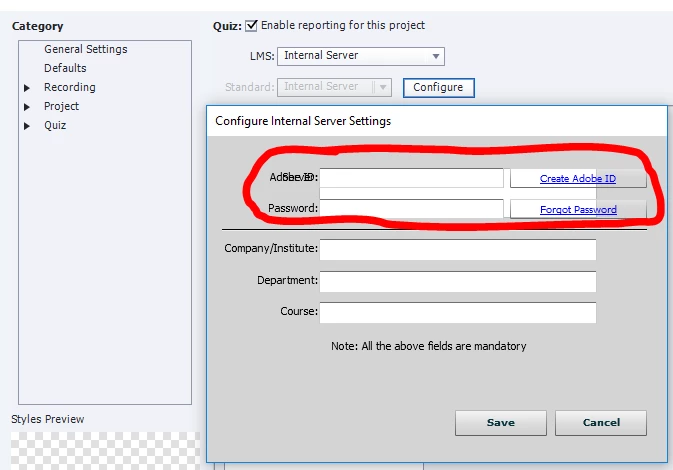
Initially, the ID and password fields did not appear when I would access this window (just the server field); I've tried populating these fields, and even tabbing to try to access the server field, but to no avail.

    This topic has been closed for replies.

    1 reply

    RodWard
    Community Expert
    Community Expert
    June 17, 2020

    Check your Display Settings in Windows to see if it is 100% or something else.

    denisec147299
    Participant
    June 18, 2020

    Hi Rod,

    If I understood your question correctly, then my setting is at 100% (image below).

    RodWard
    Community Expert
    Community Expert
    June 19, 2020

    OK.  Well that looks fine to me.


    In my versions of Captivate (9, 2017, and 2019) the Internal Server Configuration dialog looks different to yours.  So, I cannot replicate your issue.

    The extra fields that are appearing in your dialog seem to relate to your Adobe Id and password.  Is it possible you are not currently logged into your Adobe ID when using Captivate?  If this is the case, try logging in and looking at this dialog again.