Dawn White
Inspiring
May 24, 2017
Answered

Captivate 9: Quiz Review- Hiding Answers HTML5

  • May 24, 2017
  • 2 replies
  • 664 views

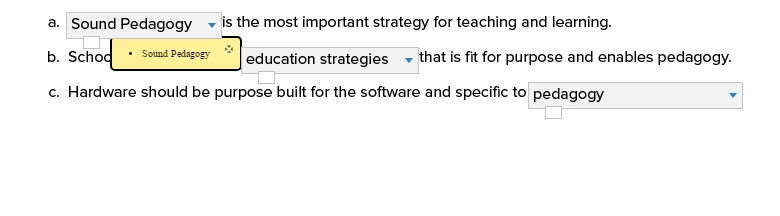
We allow our users to review and retake a quiz as many times as they need. When a user reviews a quiz, any items with drop downs (matching or fill-in-the blank)  a box appears beside some of the answers (mostly incorrect, but you can see below that there was a box for a correct answer). If a user clicks on the box, he or she has access to the correct answers.  We do not want them to have access to the correct answers but to instead review the course materials before they retake the quiz. We have overridden this in SWF output, but we are getting the boxes in the index.html file in Chrome (but not in Firefox).  Also, these are not responsive projects. Any ideas?
This topic has been closed for replies.
Correct answer this.onEnterFrame

I have two solutions for you. Both involve altering that box's CSS to hide it. 

Option 1: After publishing the course open assets\css\CPLibraryAll.css and add the following to the end of it:

.sequenceReviewImage{

visibility: hidden !important;

}

Option 2: Use jQuery to alter the CSS. Add an (Advanced) Action to each question slide to run the following JavaScript:

$('.sequenceReviewImage').hide()

They both have pros/cons.. I think adding the CSS to the file is cleaner and easier but you have to remember to add it every time you publish. 

2 replies

this.onEnterFrameCorrect answer
Inspiring
June 2, 2017

I have two solutions for you. Both involve altering that box's CSS to hide it. 

Option 1: After publishing the course open assets\css\CPLibraryAll.css and add the following to the end of it:

.sequenceReviewImage{

visibility: hidden !important;

}

Option 2: Use jQuery to alter the CSS. Add an (Advanced) Action to each question slide to run the following JavaScript:

$('.sequenceReviewImage').hide()

They both have pros/cons.. I think adding the CSS to the file is cleaner and easier but you have to remember to add it every time you publish. 

Participant
May 25, 2017

Having the same issue. After publishing in html5, when I review my assessment, any incorrect answer on a question slide, the same box appears below the option with the correct answer shown when clicked. This is box is clearly visible in Chrome (version 58.0.3029). When I open that same html file in Firefox (version 53.0.3), I do not see any visible box below. Knowing that they do appear in Chrome however, when I do hover over the same area, I do get to click, and the same pop up answer shows up. I do not want the end user to see this.

Is there a fix or a procedure that needs to be done to prevent this from happening? Ideally, I would like clicking to see the correct answer not to be happening, but I would settle for the white box not being visible in Chrome.

Dawn White
Inspiring
May 31, 2017

Yes, it sounds like the same issue.... Anyone?