


December 20, 2016
Question

Captivate 9 Quiz review mode issue

  • December 20, 2016
  • 1 reply
  • 730 views

Hi all!

I need some assistance in captivate 9. There's a issue with the Quiz typ "matching" in review mode:
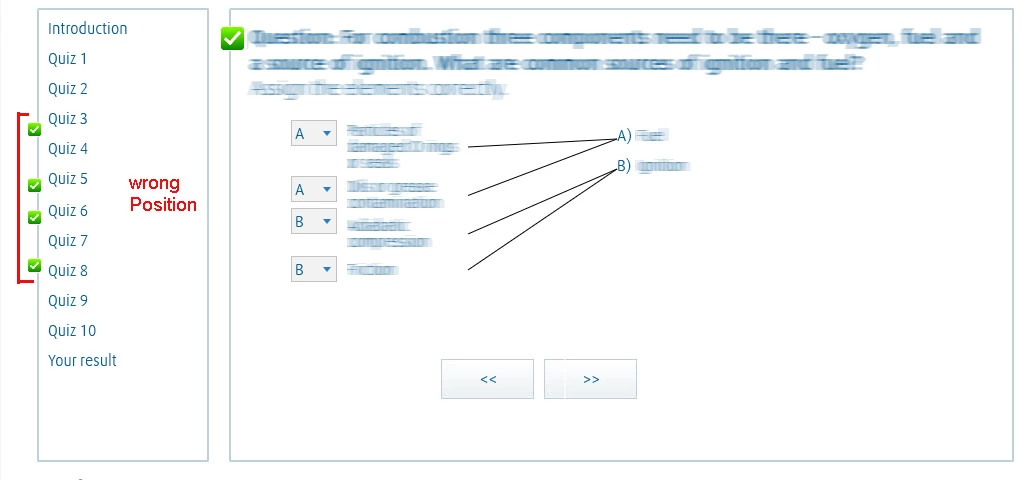
How can i change the position of the "correct_answer_normal.png" in review mode? There are no issue in other quiz types (multiple choice, single choise, ...), just in the quiz type "matching".  I tried to fix this problem in modifying the "CPLibraryAll.css" in the assets\css\ folder but with no results.

Please let me know if I need to clarify my problem, and thank you VERY MUCH in advance for your help.

    This topic has been closed for replies.

    1 reply

    Participating Frequently
    April 19, 2024

    Bumping this question.  I am encountering this EXACT issue, and really need assistance for Capt2019 Classic.

    Lilybiri
    Legend
    April 19, 2024

    Can you please tell the exact full version number,  which you can find under Help, About Captivate.

    This is the Review mode, what is wrong with the way it is indicated that this question was answered correctly? Matching type of question has no possibility for partial questions: all are correct in this case.

    Participating Frequently
    April 19, 2024

    Version 11.8.1.219


    The way it is displaying the correct and incorrect answer icons is on the far left side of the screen, nowhere near where column one or two are.  I need to be able to move those correct/incorrect flags so that they are displayed over column one, not halfway across the screen where they make no sense.   I have included a picture from a review being done on the content, please excuse the heavy redacting, my organization has pretty clear rules about what we can and can't share.