


Known Participant
February 7, 2017
Question

[Captivate 9] Runtime Dialog font

  • February 7, 2017
  • 4 replies
  • 527 views

How can I set a font for Runtime Dialog box?

Apparently the setting in Object Style Manager is ignored for some obscure reason...
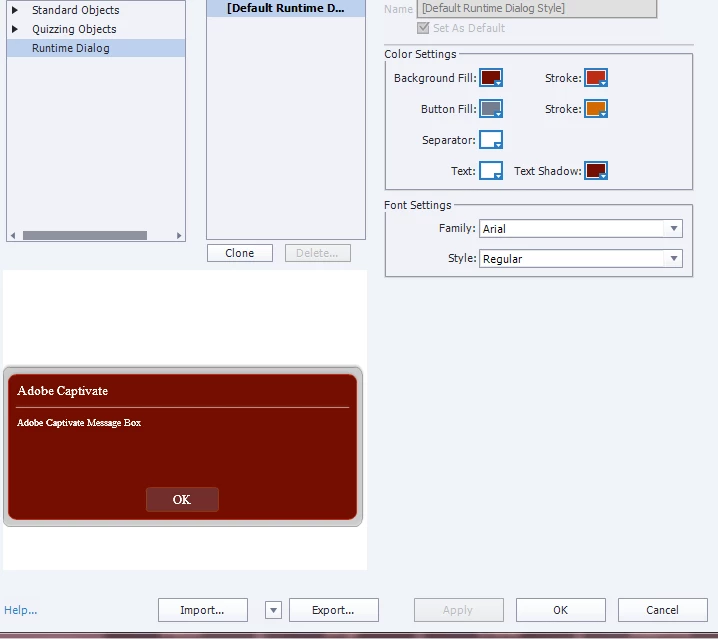
As you can see: Arial is selected, the change applied, yet both preview and real box still use Times New Roman. Why?

//UPDATE: some fonts are accepted by Captivate... for example Andalus, Georgia, Verdana... But not Arial, Courier New nor Trebuchet.

    This topic has been closed for replies.

    4 replies

    Timothy Bergkvist
    Inspiring
    November 5, 2020

    This is not the only problem--Captivate uses the Runtime Dialog when displaying messages like Submit All. Sometimes the buttons on these dialogs don't display correctly. It would be nice to have more control over the CSS in these things.


    Is there a workaround (e.g., drop in CSS or Javascript) that will fix this?

    Participant
    September 23, 2019

    I am facing the same problem and really need to use Arial.

    Participant
    June 13, 2018

    Using Veranda seems to work and is a sans-serif font.

    Lilybiri
    Legend
    February 7, 2017

    Which output? That setting seems normally only functional for HTML output.

    Orb_manAuthor
    Known Participant
    February 7, 2017

    What do you mean by "which output"?

    I will be publishing the contents as HTML 5 and both previewing and publishing the content results in Times New Roman font when I choose Arial.