Inspiring
January 20, 2016
Question

(Captivate 9) smart shape positioning changes in preview

  • January 20, 2016
  • 1 reply
  • 390 views

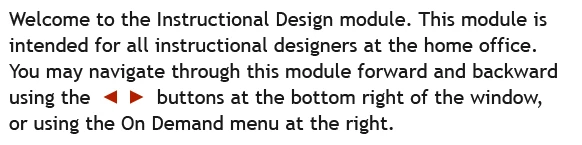
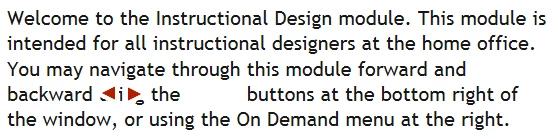
I created a slide with two smart shapes placed within some text. In the development screen they appear in the correct place, however, the preview screen shows them in the wrong place. What can I do to ensure the images stay where they are supposed to?

Darin

Dev screen
Preview screen
This topic has been closed for replies.

1 reply

Lilybiri
Legend
January 20, 2016

It is a workaround, not an answer: why do you not use characters from the Wingdings3 font? It has those triangles under t and u.

Combining shapes into text will often result in problems. The other approach is to create that text elsewhere (I use Illustrator) and create a SVG from it.

IDarinAuthor
Inspiring
January 20, 2016

Lilybiri,

Thanks for the "workaround". I am sure the Wingdings will do the trick. I am just puzzled as to why the actual buttons on the screen stay in their proper place while the two images of the buttons don't.

Darin

Lilybiri
Legend
January 20, 2016

It must be the combination of the shapes with text in a shape or a caption I presume.