Pkoel
Inspiring
December 30, 2015
Answered

Captivate 9 - Smart Shape state change

  • December 30, 2015
  • 1 reply
  • 645 views

Hello,

   I am using Captivate 9 to create a responsive project. I have created a smart shape with three different states. I would like to change the state of the object at different times in the slide. I would like normal state for the first three seconds, the heavy state for the next three seconds and the light state for the last four seconds. I could accomplish this using three different object, but am curious to know if it can be done using states of a single smart shape.

Thanks,

Peter
This topic has been closed for replies.
Correct answer Lilybiri

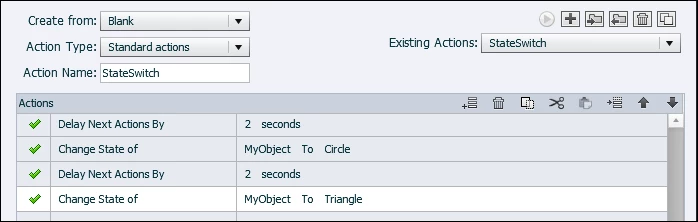
Sorry to disagree, Rick, just quickly tried it out:

  • created a shape with 3 states: Normal, Circle, Triangle  (normal state was a rectangle)
  • put it on a slide with a duration of 6 seconds, timed for rest of slide
  • created this advanced action to be triggered On Enter for that slide

Works perfectly.

1 reply

Captiv8r
Legend
December 30, 2015

Hi Peter

Personally, I think you will end up having to use three different objects. I believe the states require some action to trigger them. As there is no action other than playtime, I think you are sort of stuck there.

Cheers... Rick

Lilybiri
LilybiriCorrect answer
Legend
December 30, 2015

Sorry to disagree, Rick, just quickly tried it out:

  • created a shape with 3 states: Normal, Circle, Triangle  (normal state was a rectangle)
  • put it on a slide with a duration of 6 seconds, timed for rest of slide
  • created this advanced action to be triggered On Enter for that slide

Works perfectly.

Captiv8r
Legend
December 30, 2015

Ahhh, new actions I've not yet discovered!

All's well. I'm glad you took the bait because I nearly posted that at any moment I'm sure Lilybiri will be along to show us all how it's done.

Good job!

Cheers... Rick