Participating Frequently
March 11, 2016
Answered

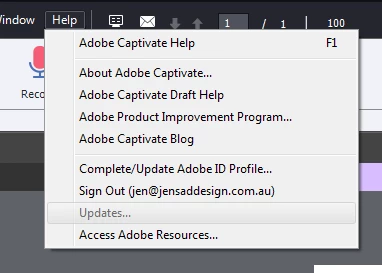
Captivate 9 update button under help menu greyed out

  • March 11, 2016
  • 1 reply
  • 1966 views

I have 2 education versions of Captivate 9, one for Mac and 1 for PC, and I received notification of a recent update available from Adobe regarding Captivate 9. I have been able to successfully update my Mac version however have been unable to update PC version as the Updates button is greyed out. See attached screen grab.

I have removed and reinstalled Captivate 9 and this has not rectified the issue.

Can anyone help?

Cheers

Jen
    This topic has been closed for replies.
    Correct answer Sreekanth_S

    Your administrator has suppressed the updates.

    1. Close Captivate.
    2. Go to C:\Program files\common files\adobe\AAMUpdaterInventory\1.0\ and rename the AdobeUpdaterAdminPrefs.dat to anything (say, just add an "_1" to the name).
    3. Launch Captivate.

    The updates option must be enabled now.

    1 reply

    Sreekanth_SCorrect answer
    Legend
    March 11, 2016

    Your administrator has suppressed the updates.

    1. Close Captivate.
    2. Go to C:\Program files\common files\adobe\AAMUpdaterInventory\1.0\ and rename the AdobeUpdaterAdminPrefs.dat to anything (say, just add an "_1" to the name).
    3. Launch Captivate.

    The updates option must be enabled now.

    Participating Frequently
    March 11, 2016

    Thank you so much. This worked perfectly.

    Cheers

    Jen