
Inspiring
May 11, 2017
Question

Captivate 9: Wingdings Checkmark Symbols Output as "P"s

  • May 11, 2017
  • 1 reply
  • 1495 views

The checkmarks display fine within Captivate, but when I preview, they end up as "P"s.
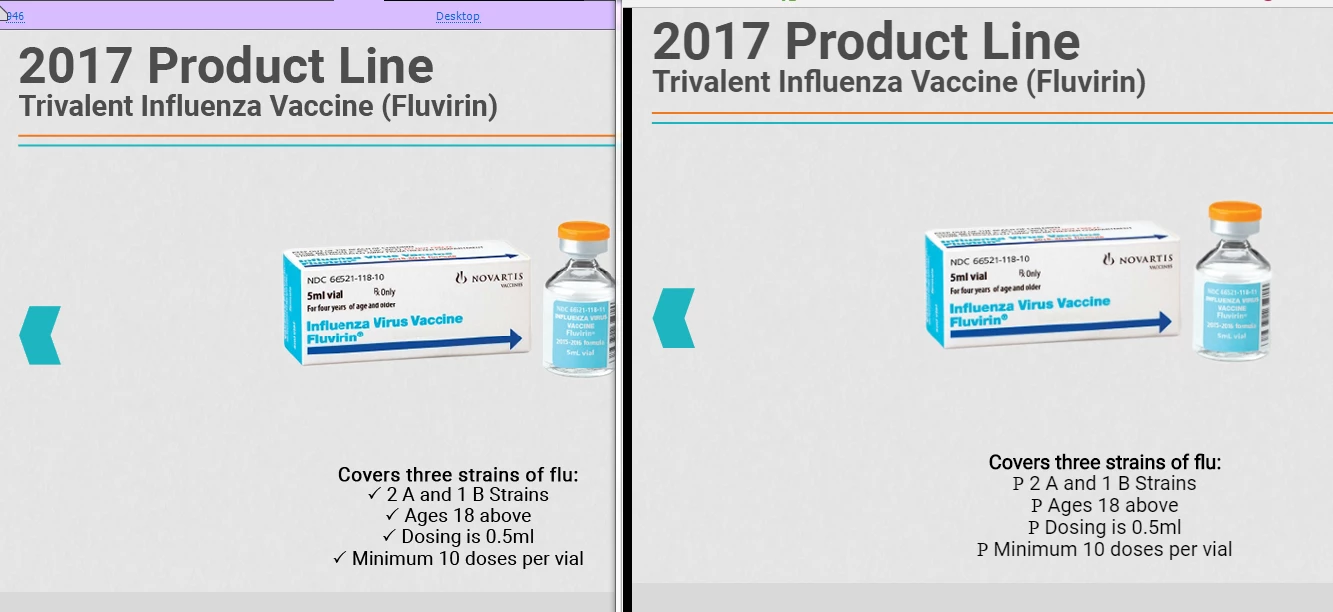

I hosted this on my work server, same thing.

Is there another way I can get checkmarks to display in Captivate?

This topic has been closed for replies.

1 reply

Lilybiri
Legend
May 11, 2017

You have to be sure that the text is converted to an image when publishing which isn't always the case. It was for static text in SWF output, easy. You don't have access to Typekit yet in CP9. The safest way would be to use an image instead of a character. If you use a SVG the file size will be very small.

JaceInmanAuthor
Inspiring
May 11, 2017

How do you convert text to images?

Also, I've found a whole other issue. I changed the checkmarks to the default bullet diamond option. The diamonds are not displaying at all. Is there any sort of fix for this?

Lilybiri
Legend
May 11, 2017

Since it is a responsive project, text will not be converted to images at all by Captivate.

What I have been doing if I had to keep a special font and glyphs, is to create the text in Illustrator and export as SVG which can be used in Captivate (text converted to outlines).  SVG is vector based, in responsive projects is scalabality important.