
Participating Frequently
February 28, 2017
Answered

Captivate Buttons for custom questions

  • February 28, 2017
  • 2 replies
  • 175 views

Hello, I am having trouble figuring out the functionality of the interactions (not interactive) buttons. I want to use the interactions to create quiz data for tracking, but I don't understand why it is not functioning intuitively. Here is a screenshot:
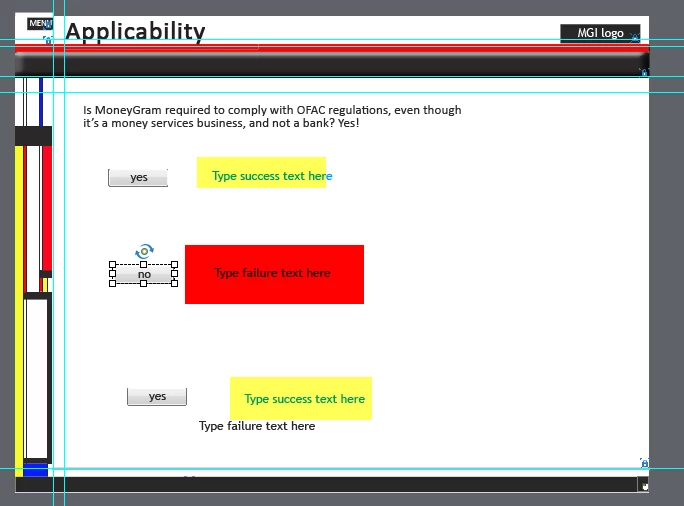
The yellow highlighted boxes appear when I click on the corresponding button....the red text does not appear when I click on its button. Here are my settings:
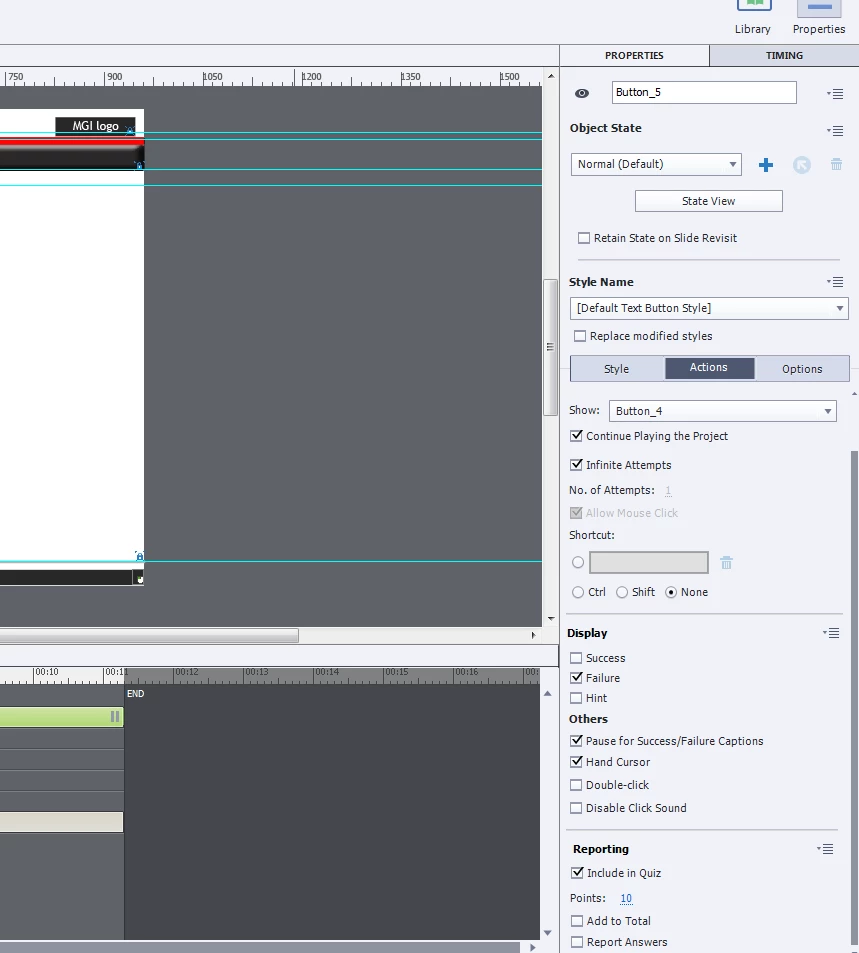
The 'failure' option is confusing me. Shouldn't it display the failure message? In my case it does not. Also, if I click on the 'no' button, the quiz counts it as a correct answer. What I want is for the three buttons to display the correct message, and for the quiz to correctly score and portray the number of questions.

    This topic has been closed for replies.
    Correct answer Lilybiri

    I changed the title of your thread to avoid confusion: you are not talking about (learning) interactions but about using buttons for scoring.

    A button has two events: the Success event and the Last Attempt event. If you have Infinite attempts, the Last Attempt event is dimmed. That is what you have in the screenshot: only the Success event can trigger an action, in this case 'Show Button_4' and the playhead is released because you left the option 'Continue Playing the Project' checked. From the very small part of the Timeline I cannot detect what will happen, because the green timeline is for an interactive object which is not selected at this moment. You really have to read this article:

    Pausing Captivate's Timeline - Captivate blog

    The feedback messages have this meaning:

    • Success message will appear when you click ON the button
    • Failure message will appear when you click outside of the button

    With your setup, when the user clicks on that button, no message appears at all because it is a Success.

    Failure message will only appear when the user doesn't click on any button.

    More about events:

    Events and (advanced) Actions - Captivate blog

    As for the score: the score attached to a button will be added to the Quiz Total when the user clicks on the button.

    2 replies

    Participating Frequently
    February 28, 2017

    Ok, that explained the functionality of the Success/Failure display. Thank you. Could not find that info anywhere. I will take a peek at the links you included.

    Lilybiri
    LilybiriCorrect answer
    Legend
    February 28, 2017

    I changed the title of your thread to avoid confusion: you are not talking about (learning) interactions but about using buttons for scoring.

    A button has two events: the Success event and the Last Attempt event. If you have Infinite attempts, the Last Attempt event is dimmed. That is what you have in the screenshot: only the Success event can trigger an action, in this case 'Show Button_4' and the playhead is released because you left the option 'Continue Playing the Project' checked. From the very small part of the Timeline I cannot detect what will happen, because the green timeline is for an interactive object which is not selected at this moment. You really have to read this article:

    Pausing Captivate's Timeline - Captivate blog

    The feedback messages have this meaning:

    • Success message will appear when you click ON the button
    • Failure message will appear when you click outside of the button

    With your setup, when the user clicks on that button, no message appears at all because it is a Success.

    Failure message will only appear when the user doesn't click on any button.

    More about events:

    Events and (advanced) Actions - Captivate blog

    As for the score: the score attached to a button will be added to the Quiz Total when the user clicks on the button.