No problem. I'll wait patiently. And yes I do need the click box to close-out the caption. Thanks!!
Hello,
Created an example, if you want me to send it send me a private message with an e-mail address.
Those are the steps:
created 7 text captions with different texts, same dimensions and location on slide but invisible; I labeled them TC1, TC3....TC7
created 1 close button that will be used for all the text captions (I used a click box and an image, but you can also use a button of course); labels CBClose (for the Click Box) and SymbolClose (for the image); both are initially also invisible
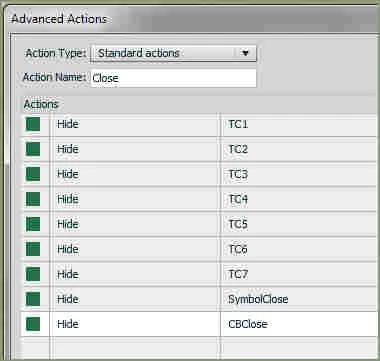
create an advanced action to be triggered on success for the click box CBClose - it hides all Text Captions (so it can be re-used for all Text Captions and I need only one advanced action and close system), as well as CBClose and SymbolClose
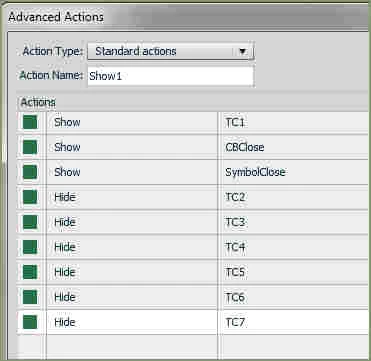
create 7 advanced actions, one for each button, labeled Show1, Show2... Show7. They are very similar and can quickly be created by using the duplicate functionality with few editing (to change the targeted Text Caption). I post a screenshot of the first one.
OK?
Lilybiri
BTW: forgot something, have a look at the Interactive Label Widget created by one of my friends: http://blog.flash-factor.com/widgets/
I do use it a lot, it would be another fancy way to achieve the same goal.
 AdChoices