


lisat21638323
Participant
November 1, 2023
Question

Captivate Classic stage disappeared

  • November 1, 2023
  • 2 replies
  • 396 views

I upgraded to Captivate Classic 11.8.2.216 and am running Ventura 13.6 on my Mac OS. When I open my older Captivate files everything seems to work great but the stage is just a blank space. Set it to "Best Fit" and nothing appears. The timeline is there and so is the film strip. This happens with files on my desk top and files on a server. It even happens with Captivate Classic Sample Projects in the eLearning Assets folder. See below:
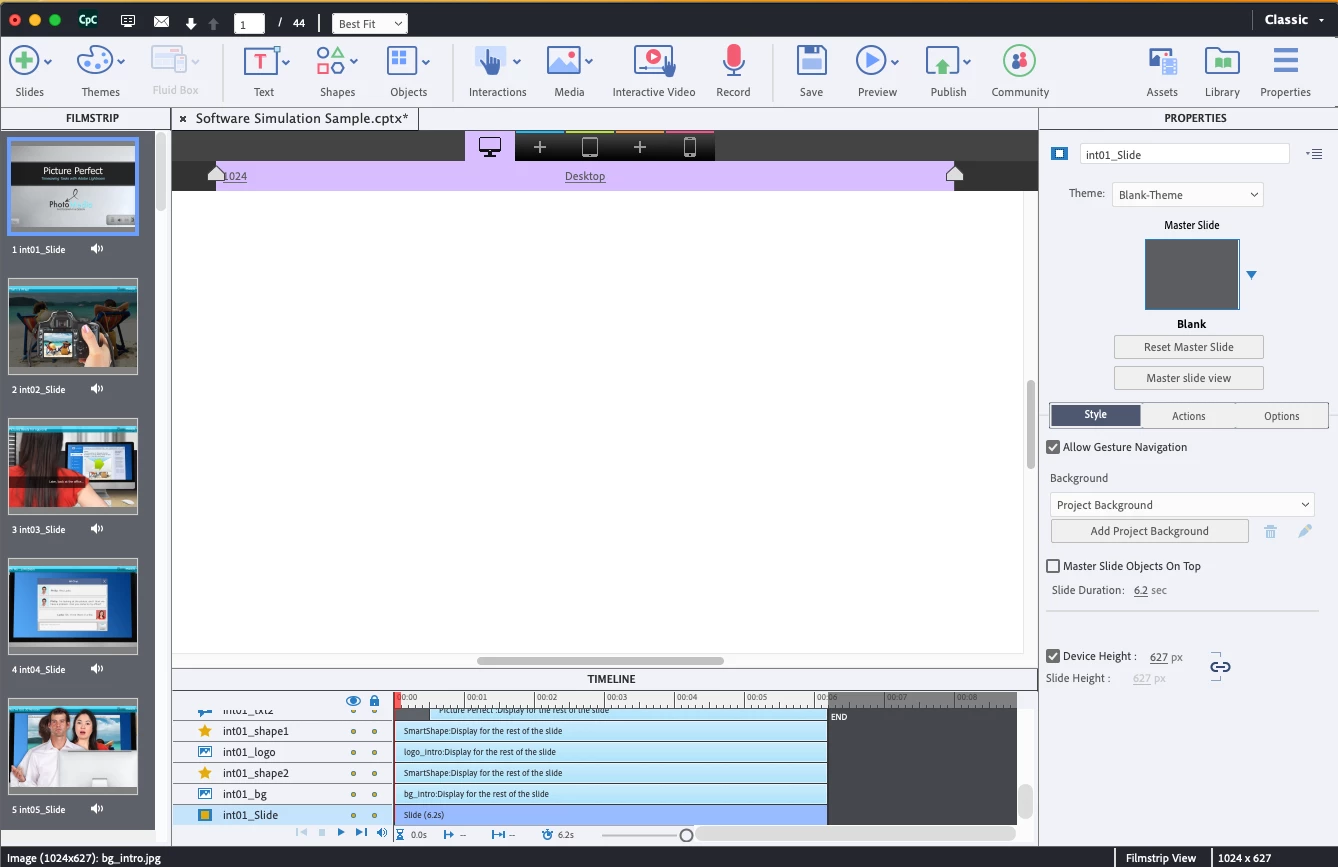
Stage is totally not there. Even if I start a brand new project you still can't see the stage. I have completely uninstalled every Captivate version I had on this computer and reinstalled the newest Captivate Classic. Still the same result. No stage. Any ideas? Thanks for any help!

    This topic has been closed for replies.

    2 replies

    kdmemory
    Inspiring
    November 2, 2023

    Hi, I run Cp Classic on MacOS Ventura 13.5.2 and don't experience your issue. Your screenshot with the empty stage shows that this particular project is a responsive project in Breakpoint mode. (See the purple bar on top of your stage set to desktop).

    Have you tried other modes like with responsive with fluid boxes or a blank project? Is there still the same problem?

    lisat21638323
    Participant
    November 2, 2023

    That project is a sample project from the CpC files. But all projects look like that. New Blank Cpc project or older Captive versions. The weird thing is it finally started working (I could see the stage and make some edits) last week and when I went in to edit some more this week the stage disappeared again. And now just hasn't reappeard no matter what I try.  I am running Ventura 13.6.2 now as of this morning after an update. Didn't matter. I wonder if I should try and go back down to the version of Ventura you are running. Not sure how to do that though.

    lisat21638323
    Participant
    November 2, 2023

    Wait my MacOS still says 13.6.1

    Lilybiri
    Legend
    November 2, 2023

    That version is buggy. Did you try the usual troubleshooting worfklows already? I talk about cleaing the cache and cleaning the Preferences. More details in:

    https://blog.lilybiri.com/tips-for-troubleshooting


    lisat21638323
    Participant
    November 2, 2023

    Yes. Cleaned Cashe and Preferences. I have been trying to work this out with Adobe and everything they are telling me to do doesn't work either. I have to be on Ventura OS for all my other applications here at work but I wasn't aware if the older 2019 Captivate was compatible with Ventura or not. If so maybe I should uninstall and go back to it?

    Lilybiri
    Legend
    November 2, 2023

    Personally I kept version 11.5.5.553 but I am a Windows user. From what I read daily here and on other media, version 11.8 has a lot of bugs and problems. Moreover some features were deprecated which were very useful. Version 12 lost even more.