


Inspiring
August 11, 2014
Question

Captivate counting wrong number of quiz questions

  • August 11, 2014
  • 7 replies
  • 5481 views

I have created a quiz in Captivate 6 (in Windows 7) that includes 6 questions. However, Captivate appears to think I have 10 questions. A previous publishing showed 8 questions. What could be causing Captivate to see more questions than what I have?
Thanks,

Darin

7 replies

Jonathan Joosten
Inspiring
July 27, 2016

Am I correct in seeing/concluding that the drag and drop interaction, even if I include it in the quiz results, does not add to the number of questions and there is no way in telling which question it is?

Lilybiri
Legend
July 27, 2016

Drag&Drop if included in the quiz will be included in all quizzing system variables: number of questions, score, percentage, number of correct questions. You will see it included in the score slide. What is missing is the Progress indicator which you can put automatically on the normal question slides. If you want to see it also on a D&D slide, you'll have to create it yourself.

As for telling which question: I suspect you talk about the reporting to the LMS? That will also depend on the LMS, but normally it should be reported if you indicate that Interaction data have to be included.

nancyj30513583
Participant
September 17, 2019
Question 5 of 5 on my quiz is a Drag&Drop quesiton. The Progress Indicator on the other questions says "X of 4" and there seems to be no way to change that to "X of 5". I tried replacing the automatic Progress Indicator with a text frame ut couldn't move it to the proper location or format it. I tried using a shape with text, but I couldn't get it to display on top of the banner. Suggestions?
Participant
July 13, 2016

Thank you for looking into this.  I cleared cache in preferences before writing my original post based on previous comments.  That didn't fix the issue.  I have a total of 8 quizzes, 4 show incorrect question numbers and 4 are correct.  I have no idea what function caused the issue but guess I'll recreate and hope this does not occur again.

Lilybiri
Legend
July 13, 2016

Did you perhaps copy/paste question slides?

Participant
July 12, 2016

I do not have pretest slides or knowledge check slides only a results slide at the end.  I am using Captivate 8.  Yes, that is the entire Advanced interaction panel.  I only have 7 slides total.  One introduction slide, 5 question slides and one results slide. 

Lilybiri
Legend
July 12, 2016

That looks like a corrupted file. I never did see a question like this on the forum (and I'm here daily). Can you first try to clear the cache (Preferences). Since it is a very short file, I wouldn't spend time to find out the culprit in this file, but recreate the project. Maybe copy/paste to a new project, slide by slide will solve the corruption.

Participant
July 12, 2016

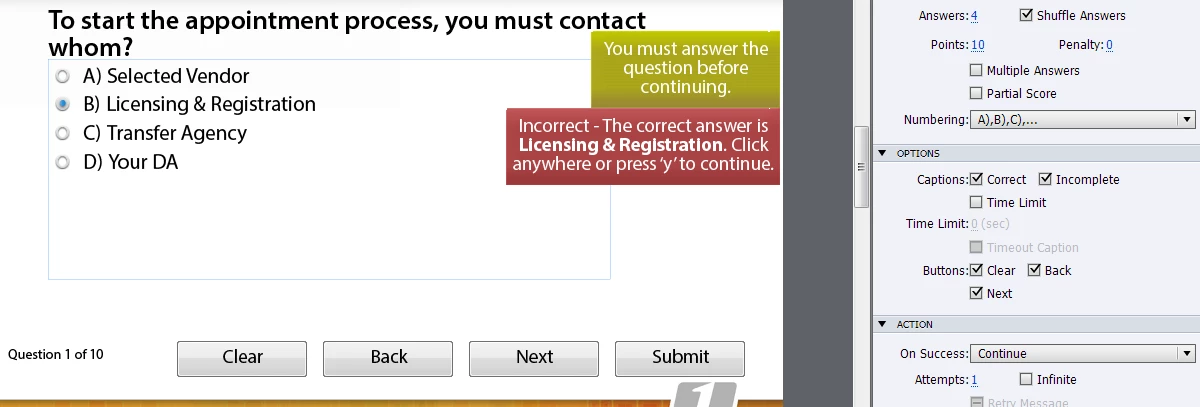
Hello, I am having the same issue as others where question numbers are not correct.  I have 5 questions and question numbers on slides show incorrectly 1 of 10 instead of correctly 1 of 5.  I have check the Advanced Interaction panel and it appears everything is scored correctly however as you can see below that screeshot, my questions slides still say 1 of 10 when I truly only have 5 questions. 

I would like to know how to prevent this from happening and how to correct.  Please help!!

Lilybiri
Legend
July 12, 2016

Not the same, the original thread was about the total number of questions, not about the numbering.

Do you have Pretest slides? Knowledge Check Slides? Which version are you using? This is the whole Advanced Interaction panel?

Some quizzing system variables like cpQuizInfoTotalQuestionsPerProject - which is used in that Progress indicator - take into account other types of questions.

rorytyer
Participant
September 19, 2015

I also have this issue, and I can't seem to find any help for it anywhere. I have seven question slides, but I'm told I have 12 total questions; I have checked and double checked and I don't have reporting enabled for anything other than the quiz questions. I cleared the cache and restarted Captivate and it hasn't changed.

Lilybiri
Legend
September 19, 2015

Did you check Advanced Interaction panel (F9)?

rorytyer
Participant
September 20, 2015

Lilibiri and Captiv8r- thank you so much for responding (I have benefited greatly from your Captivate wisdom on these forums and, in Lilybiri's case, your own blog)--here is a screenshot of my Advanced Interaction panel. I am going to go back through my project to manually check all of the click boxes just in case. But this screen seems to read as I would expect it to read, and it tells me the correct number of total points for my quiz at the end (90 points, 10 points per question, 9 actual questions as opposed to the 14 that it tells me I have).

I have also tried turning progress tracking off and on again, but that didn't work.

My current workaround is that I tell the learners how many questions will be on the quiz, and then I change the progress tracking to "absolute," which just gives the number of the question. But I know there are learners who appreciate being able to know where they are overall, and it's nice to show them that rather then have them remember how many questions there are as they are also trying to remember the information.

Participating Frequently
May 13, 2015

Hello

I have tried the above suggestion as I also have this issue. My quiz says 24 and I only have 20 quesions. The suggestion you mentioned does not help. Do you have any other ideas as I cannot manually change the top right to state Question 1 out of 20.

Thanks.

Lilybiri
Legend
May 13, 2015

You probably have some scored interactive objects as well besides the

questions. Check Advanced Interaction panel (F9) to see scored objects.

Participating Frequently
May 13, 2015

Hello - nope, nothing is there. I have added a screen dump of the 'advanced interactions' for this priject.

What else could be wrong?

Lilybiri
Legend
August 11, 2014

You probably have other scored objects besides the Question slides. All are counted in the system variables. Check Advanced Interaction panel (F9) to have an overview of all scored items.

Lilybiri

IDarinAuthor
Inspiring
August 11, 2014

Sure enough! I had two click boxes that were being counted in the quiz. I deleted those click boxes and created two more. After checking, they are no longer counting as part of the quiz. My question now is, how did they get counted in the first place? I would like to know this so I could avoid having it happen again.

Thanks.

Darin Fennell

Senior Instructional Designer

​Moderator: I took out your personal credentials

Lilybiri
Legend
August 11, 2014

How were the first click boxes added? Typically when capturing a simulation click boxes that were added will be scored both for training and assessment. Score is not part of the object style. I will always check Advanced Interaction (have it floating in my workspace for quizzing) when working on a scored course.

You didn't have to replace the click boxes, this Advanced Interaction panel is dynamically linked to the Properties panel: choose the click box that has a score, and edit the Reporting accordion.