
Participant
September 19, 2016
Answered

Captivate - Create Software Simulation - Error

  • September 19, 2016
  • 2 replies
  • 594 views

Hello,

I recently downloaded the 64bit version of this software and started the program to do my first software simulation.

I received the following error:
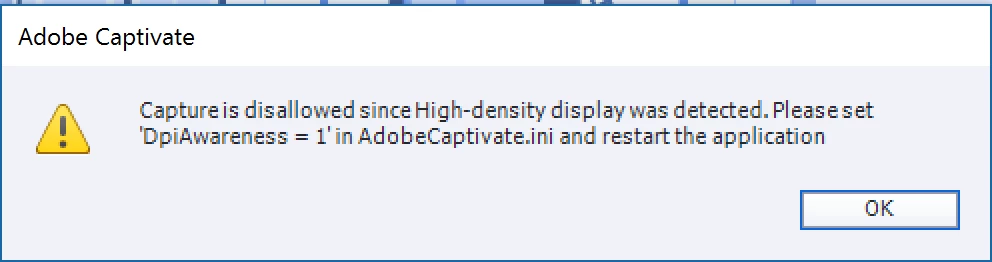
I went to the file as requested and I got an access denied when I tried to save it.

Am using Win 10 on a Surface Book and screen resolution is 2000 x 3000.

Am an administrator on my computer, please advise how to fix this.

Thanks!

This topic is closed to new replies. Start a new post to keep the conversation going.
Correct answer RodWard

Look in the Program Files > Adobe > Adobe Captivate directory and you should find a text file there called AdobeCaptivate.ini

In that file there is a setting you need to change as instructed by the error message.  This setting allows Captivate to work with your high res screen.

You may find that in order to change the setting you will first need to save a copy of the file out to your desktop (or some other folder outside Program Files) then make the change, save the file, then copy the file back into the Captivate install directory to overwrite the original file.

2 replies

RodWard
Community Expert
RodWardCommunity ExpertCorrect answer
Community Expert
September 19, 2016

Look in the Program Files > Adobe > Adobe Captivate directory and you should find a text file there called AdobeCaptivate.ini

In that file there is a setting you need to change as instructed by the error message.  This setting allows Captivate to work with your high res screen.

You may find that in order to change the setting you will first need to save a copy of the file out to your desktop (or some other folder outside Program Files) then make the change, save the file, then copy the file back into the Captivate install directory to overwrite the original file.

Participant
September 20, 2016

Thanks so much.  That worked like a charm.