Known Participant
July 23, 2021
Answered

Captivate drag sources change state on drop?

  • July 23, 2021
  • 2 replies
  • 566 views

I don't know if this is possible, but...

I have a request to build a drag and drop containing 12 drag sources (smart shapes) and two drop zones. Each drop zone has 6 correct answers.


Rather than have a submit button and feedback, the request is to have each drag source change colour to red if dropped on the incorrect drop zone, or to green when dropped on the correct one.  The user should be able redrag each source, so if they drop an item incorrectly (it runs red) they can drag it over to the correct zone and it turns green.


I've dug deep for this - I can do it if there was only one correct answer for each zone, simply by having the object actions of the drop zone change the state of the drag source, but having multiple correct answers is a different story.


Can anyone tell me if it's possible to have this state change when an object is dropped?

Thanks! 

    This topic has been closed for replies.
    Correct answer Lilybiri

    Since you already turned to the Object actions approach suggested by Rod, not to the InBuilt states for drag sources and drop targets, I suppose the last scenario was not doing exactly what you wanted.

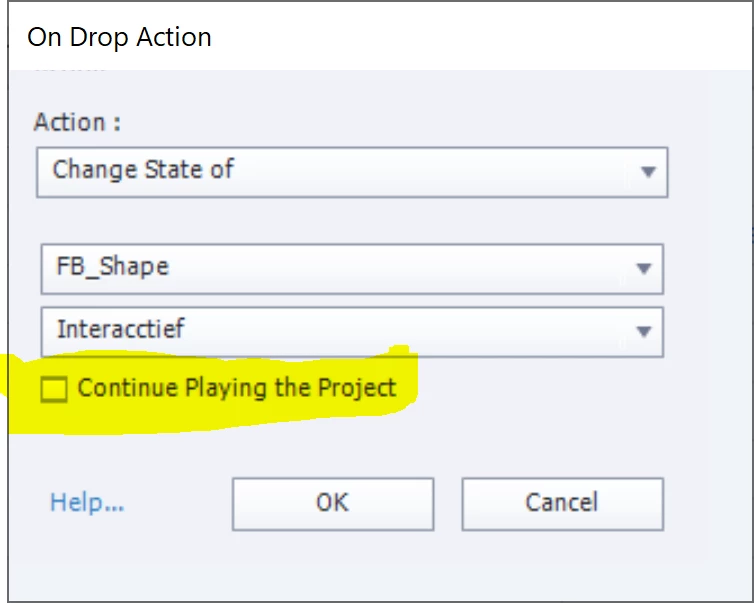
    Maybe something is awry in the setup of the D&D slide. My first suspicion would be that you have used simple actions as Object actions, and forgot to deactivate the option 'Continue Playing the Project' which is necessary in that case for each object action. If you used a shared action (would be my workflow) that is not necessary.

    Is the Replace action working as expected? If not,  can you post some screenshots of the setup?

    2 replies

    Lilybiri
    LilybiriCorrect answer
    Legend
    July 24, 2021

    Since you already turned to the Object actions approach suggested by Rod, not to the InBuilt states for drag sources and drop targets, I suppose the last scenario was not doing exactly what you wanted.

    Maybe something is awry in the setup of the D&D slide. My first suspicion would be that you have used simple actions as Object actions, and forgot to deactivate the option 'Continue Playing the Project' which is necessary in that case for each object action. If you used a shared action (would be my workflow) that is not necessary.

    Is the Replace action working as expected? If not,  can you post some screenshots of the setup?

    re_volverAuthor
    Known Participant
    July 26, 2021

    Thank you to both you and Rod.   Your answers pointed me back to the On Drop action.  The reason I couldn't apply a correct/incorrect state to the drag sources was because I had mapped them into two types.  These two types were all that was appearing in the object actions for each drop target.


    I quickly re-created the drag and drop interaction and mapped each drag source to a drop target individually.  They now show up in the object actions and I was able to change the state for each one.


    Thank you!


    Lilybiri
    Legend
    July 26, 2021

    OK, got it. I find the 'type' approach in almost all use cases to be useless, have never used it in any project.

    RodWard
    Community Expert
    Community Expert
    July 24, 2021

    Object actions can do this.  They work independent of whatever you set as the correct or incorrect answer for the overall interaction.


    I just tested this by setting up a simple Drag and Drop interaction with two drop targets and four drag sources.   You have 6 correct objects for each target, but the principle is the same.


    Each drag object had two extra states (correct = green, incorrect = red).  I set each Drop target's object actions to change the state of the drag objects dropped on them to reflect whether or not it was a correct match for that target.  It worked perfectly well.


    If your interaction is not working, there has to be something else involved.  Is there more information you can share?  Perhaps screenshots of your interaction and your object actions?