
Participant
February 8, 2023
Question

Captivate: Info panel state want effects in different states

  • February 8, 2023
  • 2 replies
  • 336 views
Exit Search
 
 
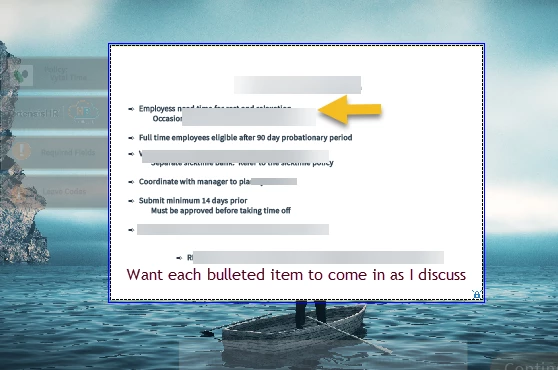
I have a 4 tab slide with an info panel that changes information based on the tab that is clicked.
However on the state of the info panel, I would like to have bulleted points come in as I am talking about it on a different state.  Any suggestions or help would be appreciated.


No relevant post is found.
 
    This topic has been closed for replies.

    2 replies

    basketc8sAuthor
    Participant
    February 8, 2023

    I have one info panel with 4 states, one for each tab. Does this help?


    Lilybiri
    Legend
    February 8, 2023

    I took out your signature. This is a public forum, don't think you want to attract spammers?

    You cannot achieve your goal with all the text in one state, you would need to split it up in a state for each added bullet. Than you can combine with Delay Next actions, eventually in a While loop. However if you want an 'Effect' on each bullet you cannot use states but need a group with text containers.

    basketc8sAuthor
    Participant
    February 16, 2023

    Thank you!  Need to determne now how I want to move forward.  Don't want to lose the interaction....

    Lilybiri
    Legend
    February 8, 2023

    Can you please clarify how you set up the appearance of the Info panels? Are those states in a multistate object or do you group them and show one item out of the group depending on the tab that has been clicked?

    Another question: do you need Closed Captioning? Because that would complicate since CC is only possible with slide audio.

    Possibilities would be to use the timeline, with staggered text containers for each bullet. Since you have multiple tabs, which means multiple info panels this should be combined with Micro-navigation to move to the appropriate frame. That will allow you to have everything in slide audio, where CC is possible.

    Another approach can be to use a multistate object for each info panel and using a shared action which includes the Delay Next actions... command in combination with Change State command.