
lynetteg1570784
Participant
May 8, 2017
Question

Captivate [Installer failed to initialize]

  • May 8, 2017
  • 2 replies
  • 1707 views

I have downloaded both 34bit and 64 bit version and this is the response I get when I click on the exe file.
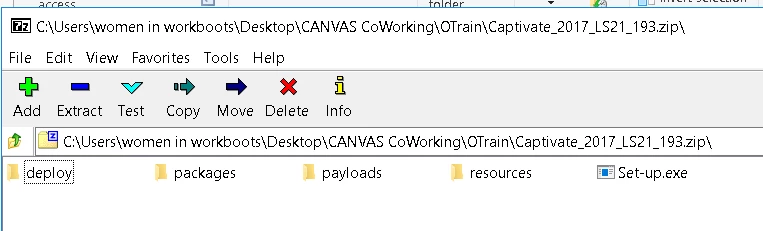
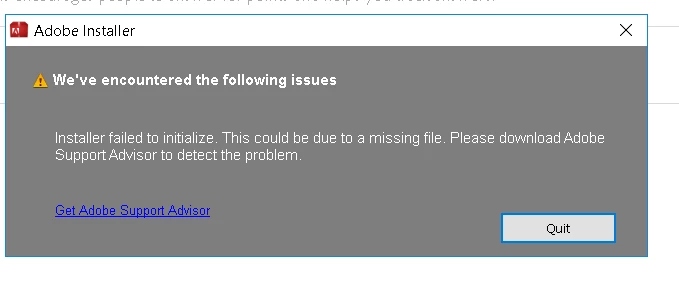
Can someone help me to find out what the problem is, so that I can open and use the program.

Many thanks

Lynette Gray

Women in Workboots

This topic has been closed for replies.

2 replies

Known Participant
August 18, 2017

Same here. I downloaded it on two different computers. Both give this same error. The program failed to initialize.

I tried uninstalling the Creative Cloud but it asks me to uninstall all my Adobe applications. Can not just uninstall the Creative Cloud App by itself. It says other Adobe programs depend on it so won't let me uninstall it.

So none of the ideas you have suggested work.

How does one install this program? Have you fixed this error yet? BTW, one of my laptops is brand new with only Adobe s/w on it.

Thank you.
kglad
Community Expert
Community Expert
August 18, 2017

os?

Known Participant
August 18, 2017

Windows 10, on both computers.

Yes I should have thought to mention it.

Thanks.

Thank you.
kglad
Community Expert
Community Expert
May 8, 2017

start at the top and work your way down applying applicable fixes until your problem is resolved.

if cc (win):  https://helpx.adobe.com/creative-cloud/kb/creative-cloud-desktop-application-failed.html

if osx 10.12 (sierra), https://helpx.adobe.com/creative-cloud/kb/install-creative-suite-mac-os-sierra.html

if, your error is:

"Installer failed to initialize. File not found." or "Installer failed to initialize. This could be due to missing files."

first, rename OOBE Folder to OOBE.old.

to find OOBE:

64 bit win OS: Program Files x86\Common Files\Adobe\OOBE

32 bit win OS: Program Files \Common Files\Adobe\OOBE

mac os: HD>library>application support>adobe>caps

mac os: USER>library>application support>adobe>OOB

if that fails or isn't the exact error you see, uninstall, clean (http://www.adobe.com/support/contact/cscleanertool.html) and reinstall.

if you're using a dvd to install:

copy the disc contents to a desktop directory and install from that directory.

if you're using a mac:

1. Try to Create a new user account in Mac with Administrator Priviledges.

2. Login to the New user, Navigate to Mac HD> Application> Utilities> Adobe Installer folder, Locate products like Adobe Reader, Adobe Flash, Adobe Air and un-install them

3. Navigate to User Library> Application Support> Adobe and move Adobe to Trash.

4. Navigate to Mac HD> Library> Application Support> Adobe and move Adobe to Trash.

5. Start the installation again.

if everything applicable above fails, check your installation logs:

http://helpx.adobe.com/photoshop-elements/kb/troubleshoot-install-using-logs-elements.html