
collen
Known Participant
April 16, 2017
Question

Captivate - Mouse click sounds not shown in Properties

  • April 16, 2017
  • 1 reply
  • 1225 views

Hi

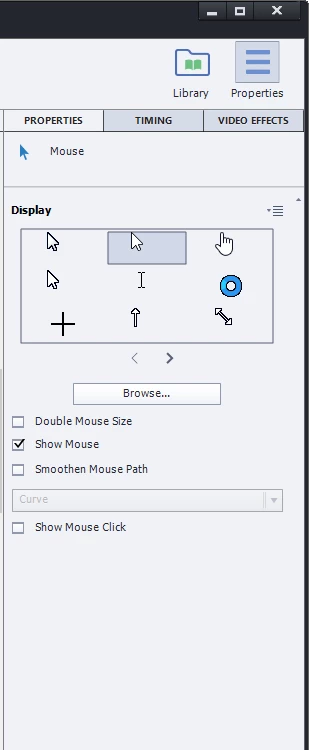
I'm brand new to Captivate, I've recorded a Video Demo of a website.  I want mouse click sounds but I don't have them.  Searching for the answer people say to turn Mouse Edits on, then click a mouse icon on the timeline, then adjust the settings in Properties on the right hand side.  But I don't have Mouse Click Sounds present in the properties.

I'm running the 30 day trial of Captivate 2017 - but I thought the trial was a fully featured version of Captivate, so I don't know why I don't have the same options as everyone else!  Can anyone else help?  I'm on a deadline here and don't want to have to drag this into Premiere and add click sounds for like a ten minute software demo

Here's a screenshot of my mouse properties panel:
Thanks

Collen

    This topic has been closed for replies.

    1 reply

    Lilybiri
    Legend
    April 16, 2017

    Trial version has all features of the full version.

    I don't know who told you about the mouse click sound. For cptx-projects, software simulations, that mouse click sound is available in the mouse properties panel. That is not the case for cpvc-projects.

    collen
    collenAuthor
    Known Participant
    April 16, 2017

    Thanks for the reply Lilybiri

    I guess I must have read an answer that was dealing with a cptx project.

    So there is no way of adding mouse clicks in Captivate when doing a screen record/video demo?  Seems strange - how do people make tutorials with mouse clicks using Captivate if so?

    Thanks

    Lilybiri
    Legend
    April 16, 2017

    Using a cptx project, software simulation which allows creating an

    interactive tutorial contrary to a passive video.