Known Participant
April 10, 2017
Question

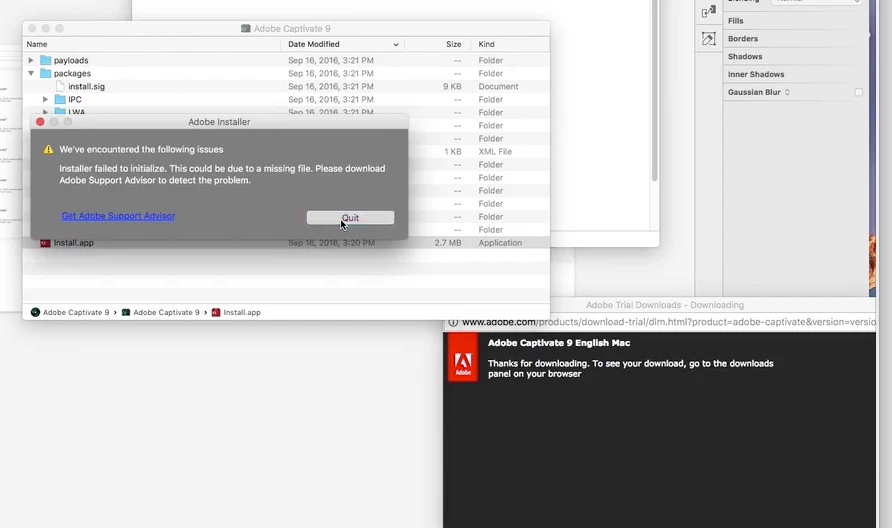
Captivate not installing.

  • April 10, 2017
  • 2 replies
  • 1236 views

Captivate installer giving users an error!!! I'm now posting this twice, once on twitter and one here. Stop wasting customers time by having them enter this twice!!!
    This topic has been closed for replies.

    2 replies

    Prahul
    Adobe Employee
    Adobe Employee
    April 11, 2017

    Yes, this is an issue that we have been facing on Sierra OS. You can follow the instructions given in the below link to install Captivate.

    https://helpx.adobe.com/captivate/kb/captivate-installation-mac-fails.html 

    jvalalAuthor
    Known Participant
    April 11, 2017

    if it doesn't work on Sierra then don't have it install! I do product and UX design and this is a crappy user experience. You don't make users 1. work-around your product, 2. deliver a product that's not functioning on a certain OS. There are many better ways to handle this situation/install process.  No one thinks they are privileged. What we know from data is that Mac users are the primary users of Adobe products, therefore if you are designing for your users, as great companies and product managers should be, then it would be best to target your use base first. 

    RodWard
    Community Expert
    Community Expert
    April 11, 2017

    Like I said earlier...you're in luck because today Captivate 2017 was released and you can install that on Sierra.

    RodWard
    Community Expert
    Community Expert
    April 11, 2017

    You're not by any chance on Sierra OS are you?

    jvalalAuthor
    Known Participant
    April 11, 2017

    yes. I am! However, it's unacceptable if this isn't supported on Sierra. This version of the OS isn't "new".

    RodWard
    Community Expert
    Community Expert
    April 11, 2017

    I take it you did not read the System Requirements for Captivate 9 before you installed it?