
Participating Frequently
February 25, 2016
Question

Captivate project file date mismatch?

  • February 25, 2016
  • 1 reply
  • 166 views

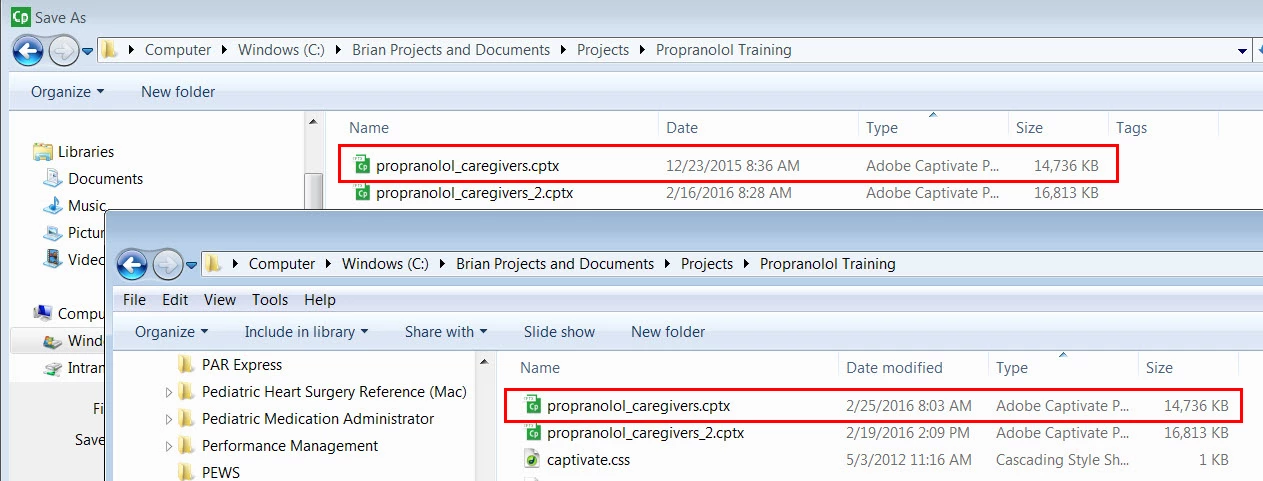
I noticed recently that when I do a Save As in Captivate, the date for the file shown in the folder view of the Save As window does not match the date in the Windows Explorer window. It's confusing and causes a bit of panic when I notice it, because I assume I've lost the version I was working on. Has anyone else seen this behavior? The date shown in the Save As window seems to correspond to the date I created the file, so could it be that Windows shows the date created by default in the Save As view?
    This topic has been closed for replies.

    1 reply

    RodWard
    Community Expert
    Community Expert
    February 25, 2016

    I think you will find those dates are not referring to the same thing.

    Check to see if one is the Create Date and the other is Date Modified.

    BrianthAuthor
    Participating Frequently
    February 25, 2016

    Thanks Rod. You're right. I just tried opening a couple other projects and found that they show a "Date Modified" field rather than a "Date" field. This appears to be my only project that displays the Date field.

    -Brian