

Participating Frequently
June 5, 2023
Question

Captivate Project not opening

  • June 5, 2023
  • 6 replies
  • 653 views

Hi All,


When trying to load up my captivate project i am presented with the below error message
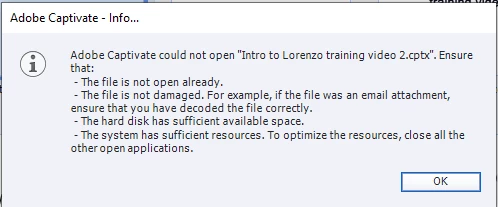
Any idea how i can fix this to access my project


Kind Regards,

Jack

This topic has been closed for replies.

6 replies

Participating Frequently
June 8, 2023

If clearing this cache will this alter or delete my saved project??

Lilybiri
Legend
June 8, 2023

If the two paths you show in the screenshot are different, there is no problem for your projects. If you want to keep the cache of one or more specific projects, open them before using the button in Preferences, General settings to delete the cache.

More information in this blog post:

https://blog.lilybiri.com/tips-for-troubleshooting


Participating Frequently
June 8, 2023

Also when loading up the project it appears with a message to say it is extracting into file, which it doesn't usually say when loading up (usually it will be generating slides)

Lilybiri
Legend
June 8, 2023

Sorry, I have edited your title, because 'loading up' is used for published projects, you are trying to open an existing raw project (cptx). This is not meant to criticize, just to make it easier to understand the problem for other users. I was confused at the start.

Did you check for backup file? Since you are busy with this project since quite a while, there should be backup files.

Also: try the usual troubleshooting workflows: clearing the cache and cleaning the Preferences.

Participating Frequently
June 8, 2023

This is how my project looks also when loading captivate up from the main application button (appears to be greyed out and cannot be selected)

RodWard
Community Expert
Community Expert
June 5, 2023

The error message you show here mostly occurs when trying to open a Captivate CPTX project file that has been edited by a version of Captivate that is slightly later than your own.


Just to be clear:  Did you already have the project open and you were trying to publish to HTML5?  Or did you see this when you tried to open the file?

Participating Frequently
June 8, 2023

This would not open when i tried to open the file from my computers files, it had worked every time for 6 months and now i cannot open

Lilybiri
Legend
June 5, 2023

This allround error message can be due to multiple causes. Can you check in the folder where it should be saved if there are any .lck files which would point to an incorrect closing of the project. That is what is meant by 'not open already' because the project would be locked. You can delete the lck files.

Did you use the default paths for your projects and is that path pointing to a folder on your system?

It is also possible that the project has corrupted. Can you find the backup file? It should be in the same folder where you saved your project.

You didn't mention if you try to open that project with the same Captivate version in which it was created? 

Participating Frequently
June 8, 2023

I am opening the same project that i have been opening and saving for the past 6 months

Lilybiri
Legend
June 8, 2023

Was anything changed on your system? I suppose you already checked the possible scenarios I mentioned in my first answer (you didn't confirm)?  

kglad
Community Expert
Community Expert
June 5, 2023

<moved from enterprise&teams>