This topic has been closed for replies.
Correct answer thisguy4xapi

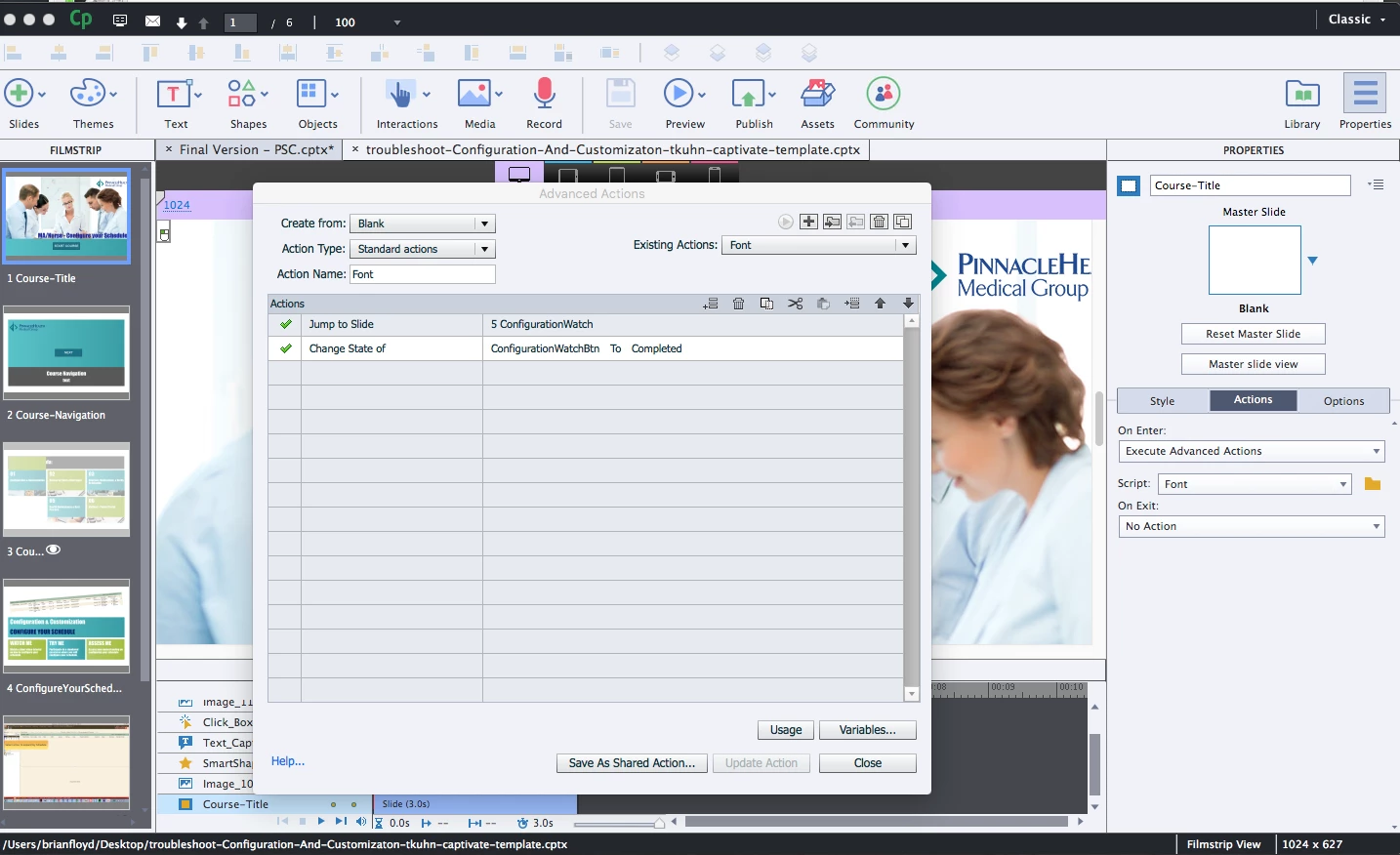
I downloaded your project....You have an advanced action of font attached to the On Enter slide on slide 1.....When I look at that action the first action is to Jump to Slide 5.....that would be your problem for sure!
Hope that helps

Brian

5 replies

thisguy4xapi
Inspiring
June 27, 2017

It's a bit of laziness on my part as well to be honest.  I have not taken the time to use a lot of the features in the last couple of releases.  I use captivate hot and heavy for 3 months and then not at all for 6 months, and that is the cycle for me (Kind of like my participation on this forum, can you tell I am in a 3 month hot and heavy cycle )

thisguy4xapi
Inspiring
June 27, 2017

1. I don't use master slides in general, and if I do I like being able to change the action on each slide.  I often use this for forward and back buttons, but sometimes forward and back is not linear in the content I create so having individual click box allows me complete control over each one.

2. I never use captivate for quizzes

3. I will agree this would be handy some times, although if I need to repeat on all slide captivate has a nifty global paste which I use frequently

4. Not using 2017 yet.

It is just more straight forward for me, and have always been 100% predictable with use on tablet, which is 95% of what I create and tablet has no use for up, down, over state as desktop does. Totally just personal preference, not necessarily the right way, just my way   In the end probably not great reasons, just what I taught myself on and what I am most comfortable using.

Lilybiri
Legend
June 27, 2017

Thanks for your answer. Myself I never use click boxes, since shape buttons appeared with version 6. And though you don't want it, you always use master slides, because you are always using a theme. I am a total autodidact as well, so strange how personal preferences can differ. I start each project by creating a custom theme....

The only place where shape buttons cannot be used is for the embedded buttons on quiz slides, but you don't use those master slides apparently.

thisguy4xapi
Inspiring
June 27, 2017

1 question, 2 statements

Question - Do you want these states to remain only for that user session or do you want them to be there whenever the user returns to the learning?   If the latter is the case we would need to use a bit of javascript for local storage.

Statement 1 - looking a the project the only button that you are acting on is the first one which is named 'ConfigurationWatchBtn' that is what your font advanced action is changing the state of for all 3 buttons.  Your second and 3rd buttons are named 'ConfigurationCustomizationBtn_7' and 'Button_11'...if you went into actions for each button and made a copy of the font script you have now (name it something different) and change the ChangeStateof to these names it should work.  Make sure that once you update the new actions that those are the ones assigned to that button...You would think captivate would do this dynamically when you edit the action, but it doesn't so make sure Execute Advanced actions is executing the right script for each button.

Statement 2 - This is how I would accomplish this as I have a dislike for buttons.  I don't ever use buttons, I always use click boxes (just personal preference, and more straight forward to me).  I would have a Watch me green box(uncompleted state) and and watch me blue box (completed state) right on top of each other.  Making sure that the completed state is on top in the timeline, and also marked invisible in the properties.  (The little eyeball up top next to object name has a red hash through it).   Finally lay your click box over the top of both boxes (again making sure the click box is on top).  When the user taps click box that is laid over it triggers an advanced action to 'show' completed state box.  You could also 'hide' the incomplete state box but as long as the completed box is on top there is really no need.   This would be repeated for each of the 3 and then you could jump to the appropriate slide.

Just clicking it would make this happen, so let's look at the 102 way of doing this.  Lets say for try me, they need to complete 4 slides before we are going to show this action is complete(no slackers here).  Create a captivate variable called tryme_complete, after the user has completed what you want them to view assign the tryme_complete variable with 1.  Then on entry of that slide that has watch me, try me etc put in a conditional advanced action that say if tryme_complete =1 'show' completed state button for try me.

Let me know if that helps, if you are stuck I could slap something together as an example and post for you.

Hope this helps!

Brian

Lilybiri
Legend
June 27, 2017

Just out of curiosity: why do you prefer click boxes which have so much limitations:

  1. cannot be used on master slides
  2. cannot be used on quiz/score slides
  3. cannot be timed for the rest of the project
  4. cannot be used in normal fluid boxes

???

thisguy4xapi
thisguy4xapiCorrect answer
Inspiring
June 27, 2017

I downloaded your project....You have an advanced action of font attached to the On Enter slide on slide 1.....When I look at that action the first action is to Jump to Slide 5.....that would be your problem for sure!

Hope that helps

Brian

Participating Frequently
June 27, 2017

Thank you!  Not sure how I managed to apply advanced actions to slide 1.

Now I'm trying to get the "completed" state for each of the button (watch me, try me, assess me) to display when returning to slide.  Initially I didn't have the update installed for the "retain state when revisiting" - I download and installed that and now it will show "completed" state on revisit.  Unfortunately it shows completed state for all 3 buttons.  Is there a way to have 3 separate Advance Actions so that each will behave individually?

Lilybiri
Legend
June 27, 2017

Sorry, I don't download projects for unknown people. But I see that you talk about 'template'. Is this a cptl-file? There are quite a lot of issues with templates at this moment. You should also mention which version (exact number) you are using.

The issue you mention sounds very, very weird. In all the years I am answering questions daily I cannot remember having seen this problem.

Participating Frequently
June 27, 2017

The file I attached is a smaller version of my project.

Consists of:

1. Intro Slide

2. 2nd Slide

3. 3rd Slide has 3 buttons on slide one goes to #4 below,

4. 4th slide is slide one of a video demo.

5. Simulation Slides of same material covered in demo but not a video demo

6. Assess Slides of same material covered in in demo and Simulation.

*Issue is Captivate has a glitch/bug that makes project start playing from number 3 the Video/Demo.  Very annoying, Articulate doesn't have this issue.

**Without looking at file, I don't see how you will be able to help me.