
aaronm74762640
Known Participant
October 20, 2017
Question

Captivate Publish Settings

  • October 20, 2017
  • 2 replies
  • 517 views

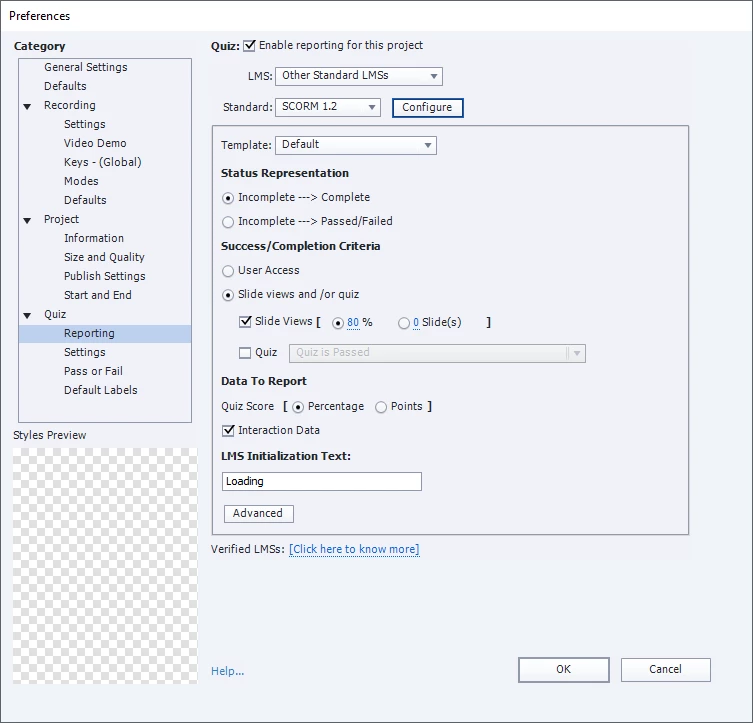
I'm having issues with our Captivate publishing to Cornerstone LMS. It seems that we have some courses not marked as complete even though the learner went and completed all slides. However, some associates are marked as complete. Would this be a browser compatibility or a LMS/Captivate setting? Attached is what we used in Captivate as a publish setting. We are using Adobe Captivate 2017.
This topic has been closed for replies.

2 replies

Known Participant
October 20, 2017

Can you share the Configure and Advanced button screens here?  I create projects with this config and it works (under SuccessFactors LMS). I only use "On User Access" for simulations but for CBTs I like to use 80-90% of the slides. And it works for me.  On User Access means if the user opens the course and views the 1st silde and closes the course the LMS considers the course as completed.

aaronm74762640
Known Participant
October 20, 2017

Lilybiri
Legend
October 20, 2017

Can you test in SCORM Cloud to see if the problem is due to the LMS or to Captivate?

Are projects using a quiz as criterion working fine?

aaronm74762640
Known Participant
October 20, 2017

So I tested it in SCORM Cloud and went through the whole course and it came back still as incomplete. There is no quiz in the course.