
Participating Frequently
June 4, 2019
Answered

Captivate Quizzes

  • June 4, 2019
  • 1 reply
  • 433 views

I am creating a quiz in captivate but can't remember how to turn off the duration on the slides.  I had to make the duration on each slide 100 seconds so that it will not automatically advance but want to remove the option.  I want the quiz to advance on user input of either "next" or "back".  Where can I go in captivate to make this happen.

Thanks
    This topic has been closed for replies.
    Correct answer Lilybiri

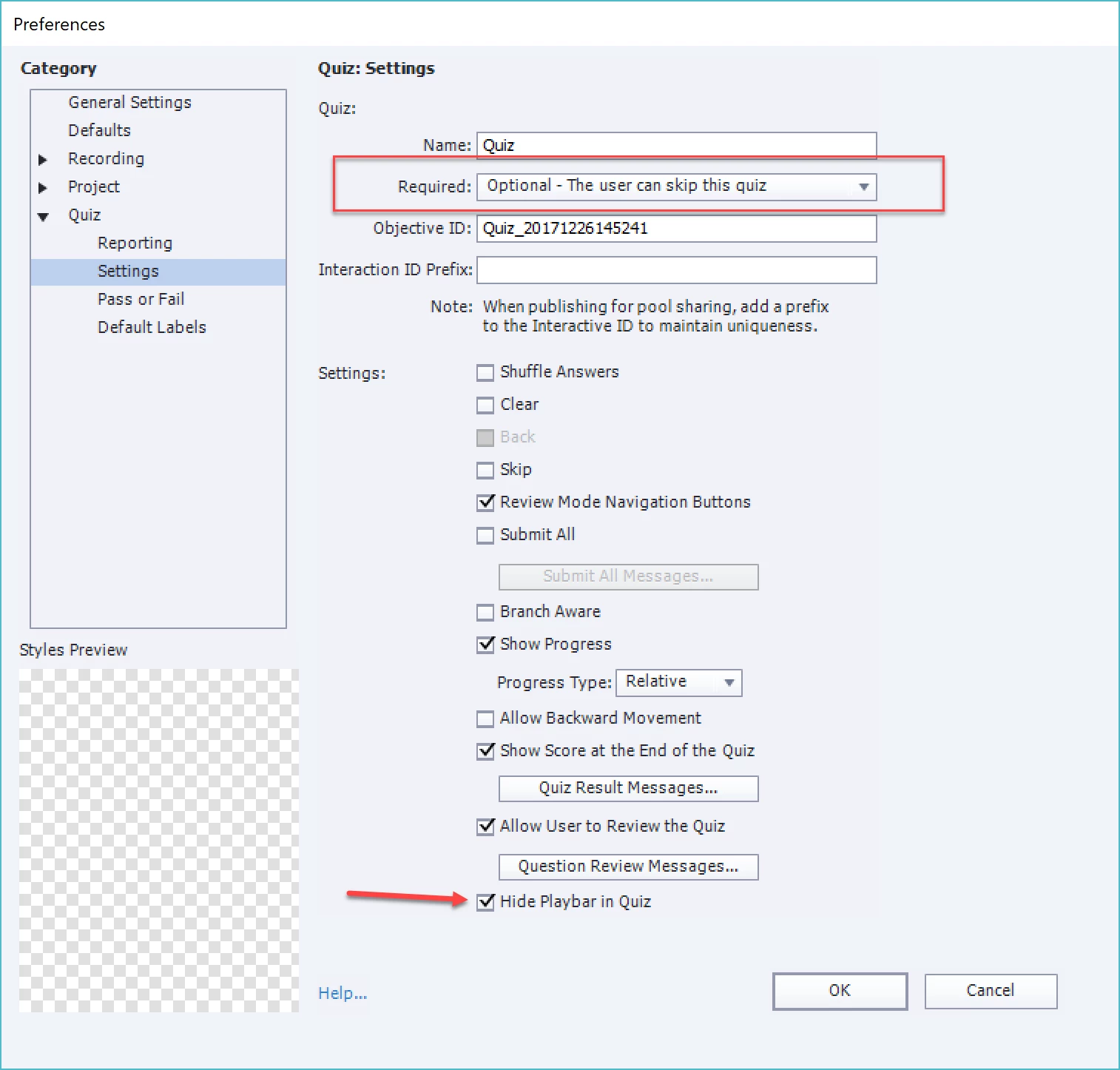
    You are too kind and thank you for being patient.  Yes I wanted a normal quiz but when i added the slides they all came up with the submit all embedded button on them.  I have put the button back on and made it 'invisible' so that it is not chosen.  I also saw where I selected the wrong options in the quiz preferences. 


    There is a blog post about the Preferences as well. Be also very careful with the field 'Required' under Settings in Quiz Preferences. Leave it at the default option 'Optional'. Do not show the Back button on the quiz slides, hide the playbar

    1 reply

    Lilybiri
    Legend
    June 4, 2019

    I don't know why this is a discussion, because it looks like a question.

    You are totally new to Captivate? Each quiz slide automatically gets a pausing point at 1,5secs, there is no reason whatsoever to increase its duration. The Submit process is set up in two steps. Only after having viewed the feedback which appears at the the first step, will the playhead be released. Have a look at this basic blog post about the Submit Process:

    ICaptivate's Quizzes (2): Submit Process - eLearning

    There is no Next button on a quiz slide, it is recommended to turn off the Back button as well in Quiz Preferences. Quiz slides have a Submit button. Only during Review the review navigatioin buttons (Back, Next) will appear if you want.

    gtrautsAuthor
    Participating Frequently
    June 4, 2019

    Yes I am new to captivate.  I got through the 2019 cerfitication in March and we just got our 2017 captivate (the Air Force is slow).  I built the module as a quiz and added the slides.  Each slide has a "back" "next" and "submit all".  I move the submit all off the canvas so that it is not visiable to the student but each slide has a duration, i changed to 100 sec, of 5 sec and it automatically advances.  How do i get that turned off so that I can have it advance on user action button?

    Lilybiri
    Legend
    June 4, 2019

    You passed the certification??? Not the first one to reach out after that (training someone personally with same problems about quizzing). Feeling very sad....

    If you did take out the Submit all, you messed up the quiz totally. Sorry to say so bluntly but the Submit or the Submit all button are the most important objects on any quiz slide.... I understand now why you have Back/Next buttons because of the feature Submit All which you activated. Do you understand really what that means?

    Please take a look at my sequence of articles about Quizzes. I sent you one link. You shoul NEVER delete or drag in the scratch area any embedded object. Maybe you'll understand quizzes a little bit better. 

    Since I was assistant in DC, I know what has not be treated and is very important: Timeline (reason why you are changing durations), Quizzes (see above) and Themes (quizzing master slides are part of the theme).