


Participant
September 23, 2019
Question

Captivate Runtime Dialog

  • September 23, 2019
  • 3 replies
  • 529 views

I am using Captivate 2019 11.5.1.499 and wanted to use the <Submit all> function in a quiz.
In the runtime dialog I am facing a problem with the layout:
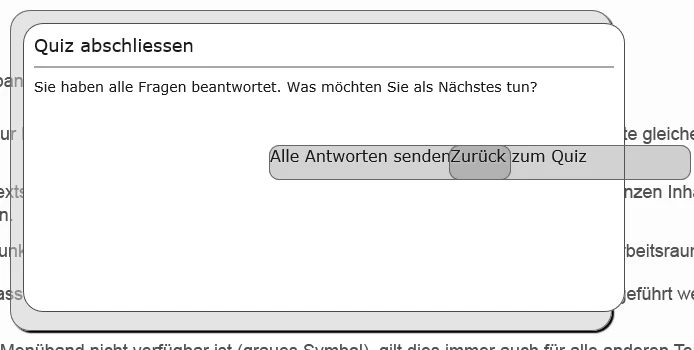
Does anyone have a suggestion how to edit the width of the buttons?
Thanks!

    3 replies

    rashis25
    Adobe Employee
    Adobe Employee
    June 25, 2020

    Here is the fix to your issue. Please find below the steps to install the hotfix.


    Pre-requisite: Install Latest version of Captivate 2019. [11.5.1.499]


    Steps:

    1. Download CPHTMLPublish.dll from : https://adobe.ly/2IjzkHl
    2. Go to install location of Captivate. (Default install location: C:\Program Files\Adobe\Adobe Captivate 2019 x64 )
    3. Rename existing CPHTMLPublish.dll to any name, e.g. CPHTMLPublish_original.dll (this is for backup purpose)
    4. Copy paste newly downloaded CPHTMLPublish.dll to the install location.
    5. Launch Captivate.


    Let us know if you still see any issues.

    Participating Frequently
    December 3, 2024

    This link returns 404. Is there a new location to download this dll?

    Participant
    October 17, 2025

    Unfortunately, even searching Adobe's site for CPHTMLPublish.dll takes you to the missing page.  Poor housekeeping on their part. 😞

    Inspiring
    June 24, 2020

    Did anybody fix this or find a workaround? (besides NOT using IE offcourse 😉

    Participant
    September 24, 2019

    Seems to be a known issue with IE and should be fixed with the next update.

    Lilybiri
    Legend
    September 25, 2019
    Indeed, using IE for HTML5 output is like putting a very small engine in a sports car.