
Pkoel
Inspiring
May 23, 2017
Answered

Captivate SCORM - ChromeVersion 58.0.3029.110 -Error loading scripts from unauthenticated sources

  • May 23, 2017
  • 3 replies
  • 2703 views

Hello Friends,

  When I try to run a Captivate SCORM module in Chrome, I am now getting a warning about the the script is from an unauthenticated source. The site I am using is set to use HTTPS. Is there a security setting in Captivate that I must set so that I will no longer get this warning?
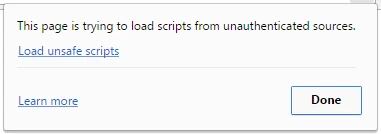
Any ideas or suggestions?

Sincerely,

Peter

    This topic has been closed for replies.
    Correct answer RodWard

    Dear RodWard,

      Thanks for the fast reply. How do I change that setting in Captivate 2017? I does not appear in the project preferences, nor in the SCORM module settings.

    Thanks,

    Peter


    It's not available as a setting that you can change.  I suggest you first try changing it in the published output HTM file to see if that resolves the issue.  If it does, then you may need to edit the template file inside the Captivate installation directory so that the changed file is used each time you publish.

    3 replies

    Erik Lord
    Inspiring
    August 14, 2017

    It's likely not 'in moodle'.

    After you publish the piece, look at the HTML and JS files and search for 'http'

    Anywhere you find 'http', change it to 'https'.

    Save those files after the change.

    Rezip the files.

    upload the new .zip file to Moodle.

    Should work

    zeeb8
    Participant
    June 14, 2017

    Hi, I wanted to add one last part to this.  I needed to do one additional step to get it to work.  According to the Google Chrome Debugger (Developer Console) the error was due to the http part of the link: 'http://www.adobe.com/shockwave/download/download.cgi?P1_Prod_Version=ShockwaveFlash'  as mentioned before.

    The part I am adding is that just changing that URL from http to https did not resolve the issue.  I then got the error message:

    Mixed Content: The page at 'https://iri.learn.com/files/upload/SSQ_Training/SS_QTV/Behavioral_Target/multiscreen.html' was loaded over HTTPS, but requested an insecure resource 'http://get.adobe.com/flashplayer/'. This request has been blocked; the content must be served over HTTPS.

    So I believe the solution was to change that problem URL to:  'https://get.adobe.com/flashplayer/' .  Hope it is ok to switch it to that link - that is the only way I could resolve the issue.

    Participant
    July 25, 2017

    Hi,

    Could you please help me ?, I am unable to find the file in which i have to change the URL

    s88mktgteam
    Participating Frequently
    August 14, 2017

    It is the SCORM_utilities.js file. If you open it in a text editor, you can change the url. I am trying this right now, as just changing http to https indeed did not resolve the issue.

    Pkoel
    PkoelAuthor
    Inspiring
    May 23, 2017

    Update: When I look at the Google Console I get the following error:

    CBT_Advanced_Spear_Phishing.htm:1 Mixed Content: The page at 'https://learn.americanbus.com/moodle/mod/scorm/player.php?a=93&currentorg=ASP_ID1_ORG&scoid=192&sesskey=X886xB99If&display=popup&mode=normal' was loaded over HTTPS, but requested an insecure resource 'http://www.adobe.com/shockwave/download/download.cgi?P1_Prod_Version=ShockwaveFlash'. This request has been blocked; the content must be served over HTTPS.

    Any ideas on how to fix the last sentence?

    RodWard
    Community Expert
    Community Expert
    May 23, 2017

    It doesn't like the fact that the Adobe Shockwave site isn't HTTPS.  That's why it's complaining.

    You can try changing the http to https on the Adobe URL and see if it then works.

    Pkoel
    PkoelAuthor
    Inspiring
    May 23, 2017

    Dear RodWard,

      Thanks for the fast reply. How do I change that setting in Captivate 2017? I does not appear in the project preferences, nor in the SCORM module settings.

    Thanks,

    Peter