jennyt83516063
Participant
November 29, 2018
Question

Captivate scrolling capture failture in software simulation mode

  • November 29, 2018
  • 1 reply
  • 1182 views

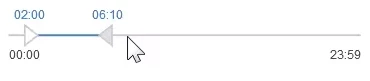
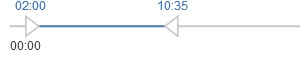
I'm making an interactive video using software simulation mode, and in the video I need to have a scroll button that users can drag from the left of the slider to the right, but Captivate didn't capture the action and there wasn't a scrolling item shown that I can drag. Can anyone help to solve the problem? Thanks a lot.

This topic has been closed for replies.

1 reply

Lilybiri
Legend
November 29, 2018

I suspect you are using the Software simulation, probably in Demo mode? Those 'moving' actions should be captured in a FMR slde. FMR is Full  Motion Recording. That worked fine for SWF output. However I learned that it is not always working OK for HTML5 output. Since several versions I do use another workflow: I stop the recording when I expect such a slide to occur, and insert/record a Video Demo slide instead. After that slide I continue the normal sim recording. Bit cumbersome, but it gives a much better result.

Inspiring
November 29, 2018

If I understand Jenny correctly, she expects those data range sliders in the image above to actually be operational (that is the learner could actually drag them to and fro horizontally) after capturing in Training Simulation mode.

If that's the case Jenny, you're asking too much of that poor Simulation feature here. Captivate has no native support for data range sliders, and thus no tools on board to simulate that. If you wanted to implement such functionality, you would have to  build that in JavaScript or include some JavaScript library that adds support for range sliders.