
stever72240430
Known Participant
March 24, 2017
Answered

Captivate Software Sim in Demo Mode adds Click boxes!

  • March 24, 2017
  • 1 reply
  • 500 views

Hi folks,

I have a template for recording Demonstration software simulations. This template has been used numerous times with no issues.

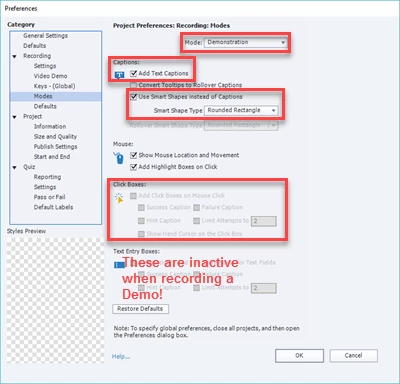
All of a sudden, when I record a demo, the subsequent slides no longer display the callout type, which is a Smartshape rounded box, and even worse, each slide now has a Click button and Wrong and Hint boxes.  It is not recording a true demonstration, which doesn't have Click boxes.  It's acting like something is corrupted in Captivate.

Has anyone dealt with this issue before?
    This topic has been closed for replies.
    Correct answer RodWard

    I would be deleting the corrupted template.

    Why not just do your captures at the same height and width as your template and then paste the capture slides into it?

    1 reply

    RodWard
    Community Expert
    Community Expert
    March 24, 2017

    Are you sure you did not inadvertently select Training mode instead of Demo mode?

    stever72240430
    Known Participant
    March 24, 2017

    Absolutely Ron, I have tried this 7-8 times, but the Demonstration mode inserts Click boxes.  It acts like its actually doing Training mode.

    I tried creating a Software Sim without using my template, and Demo mode works fine.  Somehow the template file, which is a .cptx file that we open and do a Save As to new file name, appears corrupted. Would deleting my cached projects help?

    RodWard
    Community Expert
    RodWardCommunity ExpertCorrect answer
    Community Expert
    March 24, 2017

    I would be deleting the corrupted template.

    Why not just do your captures at the same height and width as your template and then paste the capture slides into it?