Captivate Table of Contents (TOC)
Hi,
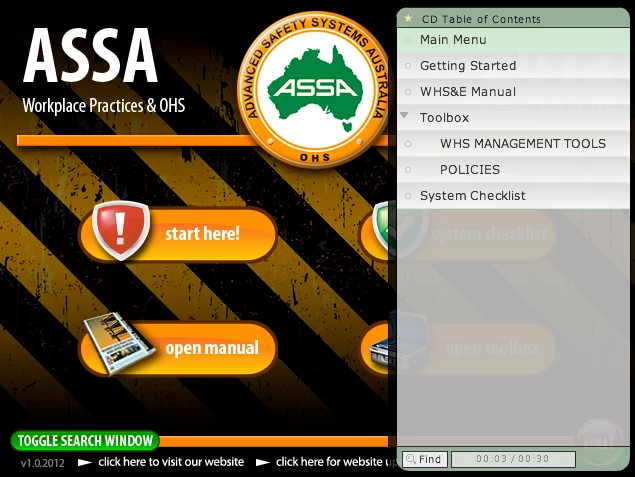
I am putting together a multimedia CD in Captivate, which will basically have a nice interface for users to navigate to attached PDF and DOC files, and a little video instruction here and there. I want to include a search and table of contents facility and the one built into captivate is ALMOST PERFECT! However, the current time/total time box at the bottom would make no sense to users as this is a multimedia CD. So I would like to hide that. Also, the find button requires clicking to open the search text box. I have had a few comments saying they could not see where to type their search text (they didnt realise they had to click find, so I am hoping to be able to change the text on this button to 'Click to Search' or something like that. If we can hide the current time/total time box it would be better, as it looks to me and others like this would be where you would type your search text (as it is next to the find button).
Also, if possible, remove the bookmark star icon at the top completely, as they are really not necessary and I want the interface for users to be as simple as possible.
I would appreciate any ideas, or alternative ways of implementing a search facility.
I have included a screenshot of my current interface so you can see what I am talking about.
Thanks.
 AdChoices