


Inspiring
June 1, 2021
Answered

Captivate transparent buttons remain even though not active in timeline

  • June 1, 2021
  • 2 replies
  • 476 views

Hello, Captivate Community!


I'm hoping someone out there can help me with my interactive video. To demonstrate my dilemma, I have created transparent buttons that appear over white boxes when the boxes appear on a grey background. When the button is clicked, it jumps to a bookmark and continues playing until the playhead is paused by another button. But when the button is clicked upon, it still remains throughout the rest of the video. Eventually, with so many transparent buttons covering the screen, the user is in danger of pressing another button sending them back in the timeline to an unintended area of the video.


As you can see here, there are never more than one button active on the timeline.



Does anyone know how to make the button disappear from the video once it is successfully clicked on? I can only do one thing on success, correct? I cannot add two things that occur, can I?


I've posted the captivate project file here:
https://app.box.com/s/1jo3gldssodbx666nasduzd7877w34ey



    This topic has been closed for replies.
    Correct answer Lilybiri

    Sorry, but I don't download any attachment, from unknown origin for several reasons. I am just a user.

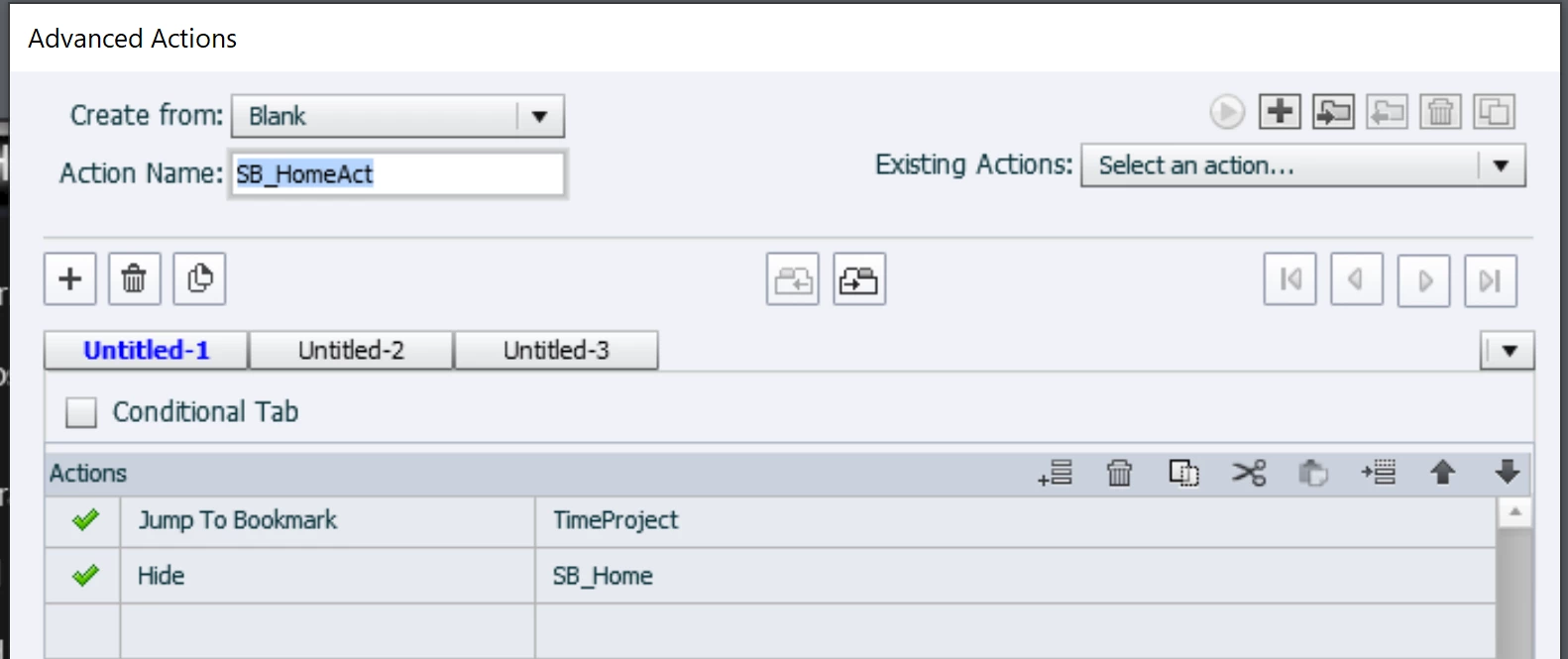
    This looks a very strange setup. To answer your question directly: use an advanced or better, a shared action to be triggered by the buttons, and add the command 'Delete buttonX' to the 'Go to Bookmark' command.

    1. Use the option 'Execute Advanced action'
    2. Click the browser button, it will open the Advanced Actions dialog box.
    3. Give a name to the action (unique name!!!!)
    4. Enter two commands like in this screenshot
    5. You can duplicate the advanced action, and edit both name, bookmark name and button name. Be careful: each name needs to be unique for the other buttons.


    My approach to buttons in an interactive video is visible in this published example:

    Play/Pause button


    2 replies

    TLCMediaDesign
    Inspiring
    June 1, 2021

    You can do multiple things in an Advanced Action. That appears to be a bug to me. I've only used buttons to the side of the video and they were always active like chapters.

    Lilybiri
    LilybiriCorrect answer
    Legend
    June 1, 2021

    Sorry, but I don't download any attachment, from unknown origin for several reasons. I am just a user.

    This looks a very strange setup. To answer your question directly: use an advanced or better, a shared action to be triggered by the buttons, and add the command 'Delete buttonX' to the 'Go to Bookmark' command.

    1. Use the option 'Execute Advanced action'
    2. Click the browser button, it will open the Advanced Actions dialog box.
    3. Give a name to the action (unique name!!!!)
    4. Enter two commands like in this screenshot
    5. You can duplicate the advanced action, and edit both name, bookmark name and button name. Be careful: each name needs to be unique for the other buttons.


    My approach to buttons in an interactive video is visible in this published example:

    Play/Pause button


    Inspiring
    June 1, 2021

    Yes, that was the solution! I knew there was a way to do that, and you sure helped me a bunch by telling me how to acheive that! Thanks!!!