


Participant
March 14, 2023
Question

Captivate Video Demo Editing

  • March 14, 2023
  • 3 replies
  • 2357 views

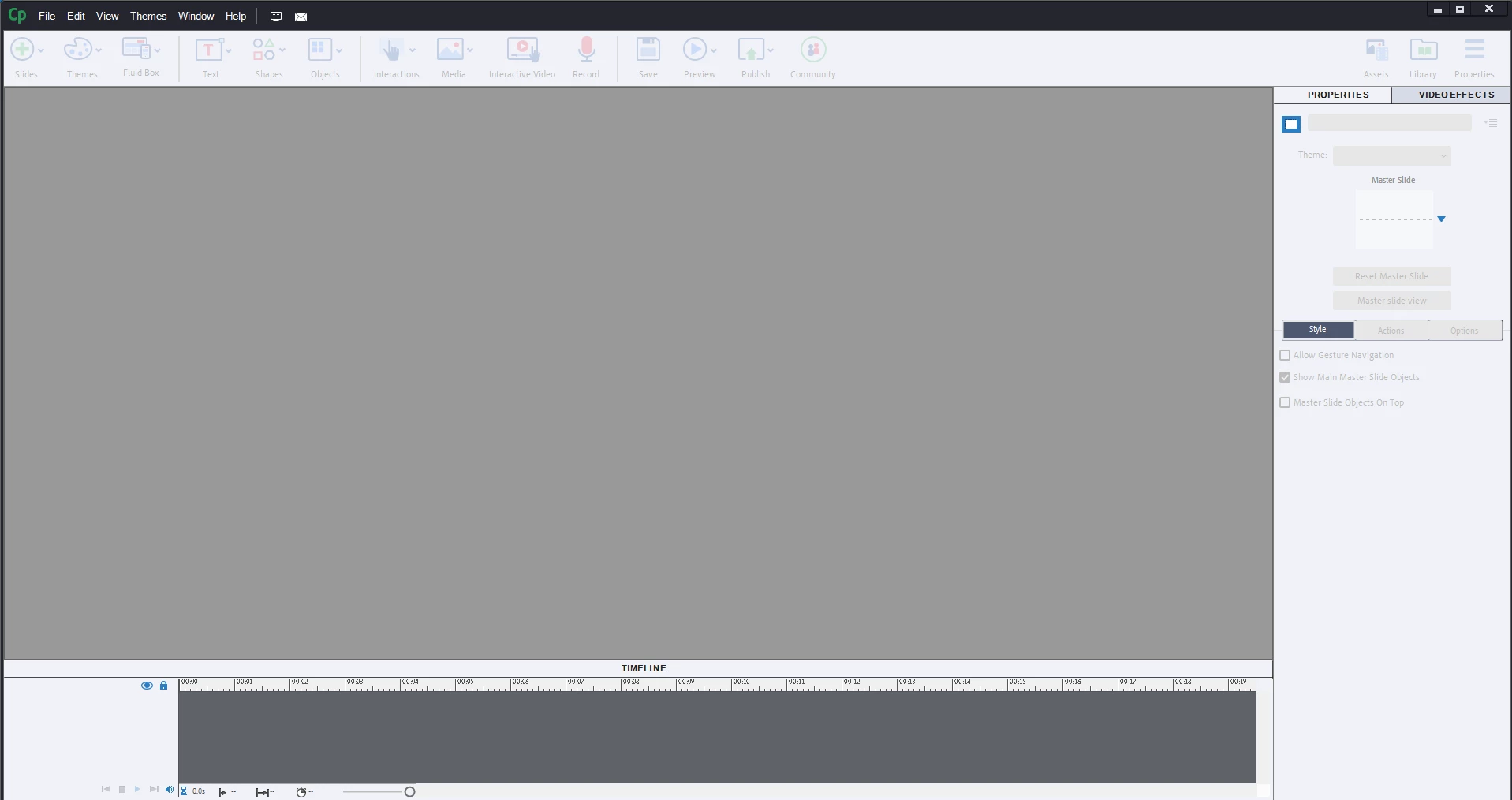
I recently upgraded to the latest Captivate verison. When I go to edit a video demo and select Exit, my screen turns gray and I am unable to go back to my other modules without exiting out of the entire project and reopening Captivate. Is anyone else having this issue?
 

    This topic has been closed for replies.

    3 replies

    RodWard
    Community Expert
    Community Expert
    March 15, 2023

    When the Captivate screen goes grey like this, try hitting the ESCAPE key.  If that seems to return control to you, then your problem might be due to having a modal dialog appearing somewhere off screen.  You may have been using dual monitors with a different (left-right) orientation to the main screen and Captivate is still displaying that dialog but you cannot see it to interact with it.

    Participant
    March 15, 2023

    I tried this and still did not send me back to the project. Once we click on edit video demo and select exit and save, the old version would bring us back to the main project. But it is stuck on edit video and I have to save and close Captivate and open the project back up to continue editing other slides. I am including a screen shot of the screen I am trying to get back to after we edit 1 video. 


    Lilybiri
    Legend
    March 15, 2023

    Screenshot makes me realize that you are using the editor from within a cptx-project. How did you get the Video Demo slide in the project, because there are two ways:

    • Directly by using the big button Slides, Video Demo and than record the video.
    • By creating the cpvc-project and insert it using the menu Insert, CPVC-slide.

    Sorry, ignore this comment, because you want an answer from the two other people.

    Community Expert
    March 15, 2023

    So sorry to see you are having issues. Captivate is a bit buggy. But i would say stay clear away from the Video editing in Captivate. The edits just dont seem to come out so smoothly, and you are so limited in options. I recommend trying to export your video and edit it in Adobe Premiere --- these basic edits will be soooooo much easier, and you can easily edit the audio, add motion graphics, text, lower thirds, color correct and sooo much more. But at the basic level of even simple cuts its worth your while. Most of the time I tried editing in Captivate it would just mess up my movie or the audio and graphics would end up not being synched.

    Hope this helps!
    Mark

    headTrix, Inc. | Adobe Certified Training & Consulting
    Participant
    March 15, 2023

    Thank you for the response. We create SCORM files, less MP4 so is there another way to edit a video without importing?

    Community Expert
    March 15, 2023

    I would suggst using a different screen capture software, there are plenty of decent free ones....
    and doing your editing in Premiere or some other video app. Then importing the final completed video into Captivate. 

    Hope that makes sense. Not sure if I answered your question. Let me know if I can help.

    Mark

    headTrix, Inc. | Adobe Certified Training & Consulting
    kglad
    Community Expert
    Community Expert
    March 14, 2023

    in the future, to find the best place to post your message, use the list here, https://community.adobe.com/


    p.s. i don't think the adobe website, and forums in particular, are easy to navigate, so don't spend a lot of time searching that forum list. do your best and we'll move the post if it helps you get responses.


    <moved from using the community>

    Lilybiri
    Legend
    March 15, 2023

    I had seen your question last night, but wanted to see if I can replicate the problem.  I have 11.8.1 installed on another system but didn't yet use the Video Demo on that one. I always use Video Demo and its competent, non-destructive editor to create videos to be used as independent videos, as base for interactive video or to be embedded as an asset in a more complete tutorial. Based on my experience I wrote out some blogs, this is one of them:

    https://blog.lilybiri.com/video-demo-tips

    If used for a long video, I prefer creating shorter demo clips in Video Demo and assemble them with Premiere Rush. That application, also available on iPad is more than sufficient for eLearning videos, PP is overkill. The core of the videos, including replacement of the audio I always do in the Video Demo editor. All the webinars I presented have a video which has been created with Video Demo. Since I strongly believe that interactive tutorials are much more powerful than passive video, my priority is not on YT videos.


    I wait for you to try out the suggestion by Rod Ward about the escape key.  Do you use a multimonitor setup?