davidG_Siemens
Participating Frequently
May 16, 2022
Respondido

Captivate9 will not open

  • May 16, 2022
  • 1 resposta
  • 636 Visualizações

Hello, I have read the other posts about this problem but none seem to resolve the issue. When I try to open the program, it will begin to initialize (I see the start-up screen and the first 2 processes running in the bottom left corner) but then the screen disappears. No indication that the program is doing anything after that. I have tried running as administator, I restarted my computer, I reloaded the entire program. The icon on the tray does not show that it is open but I can see that it is "running" in Task Mgr. although not really consuming any resources. 

Any ideas? I need this to do my job. 

    Este tópico foi fechado para respostas.
    Melhor resposta por RodWard

    I should mention that this is an extracted zip file that I originally downloaded when we bought the program. 


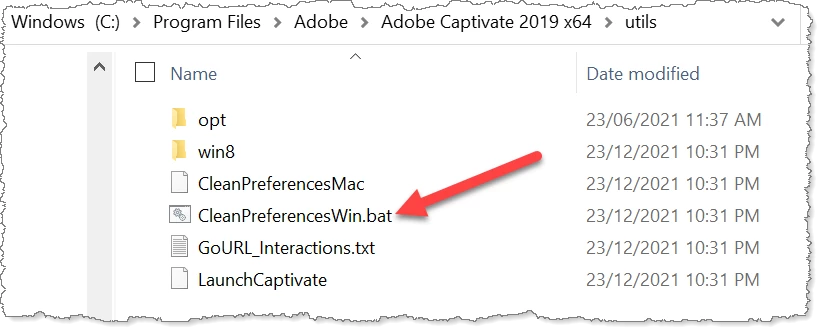
    Those are the files downloaded for you to install Captivate.  If you have already installed Captivate then you need to look inside the folder on your system where Captivate is now installed.  For Captivate 2019 would be something like this:

    C:\Program Files\Adobe\Adobe Captivate 2019 x64\utils


    This is what you should see there:

    You need to double-click the CleanPreferencesWin.bat file to execute it.  However, if you are in a corporate environment, this task may need to be performed by someone from your IT department who has Admin privileges.

    1 Resposta

    Lilybiri
    Legend
    May 16, 2022

    Are you sure that the application is installed on your system, not on a networked drive? Do the paths in Preferences for the files and the cache both point to folders on your system, not on external drives or network drives?

    Do you know exactly which version you are running on which OS?

    davidG_Siemens
    Participating Frequently
    May 16, 2022

    Captivate 2019 (64 bit) is on my C: and I run Windows 10 Enterprise. It has been running without a problem. I have Captivate Projects and Cached Project folders in my Documents. 

    Lilybiri
    Legend
    May 16, 2022

    !There have been so many releases under the name 'CP2019'... three main ones: 11.0, 11.5, 11.8. Please check the full version number.

    Since it has been running without a problem something has changed; new applications, update to OS