March 24, 2014
Answered

Captive 7 Issue - Playbar, pause and other action not available with the skins

  • March 24, 2014
  • 1 reply
  • 535 views

I am using Captivate 7 on Windows 7.

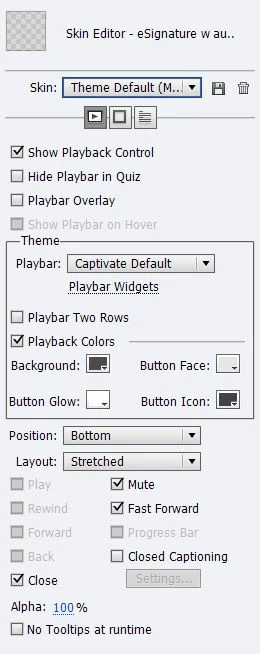
The video I am creating is using a compenation of demo, guided practice, and quizes/assesments. When I go to edit the skin I cannot select the following:

Play

Rewind

Forward

Back

Progress bar
In the  quiz preferences I have the following options selected:

Show Progress

Allow backward movement

Show schore at the end of the quiz

Allow Users  to review the quiz
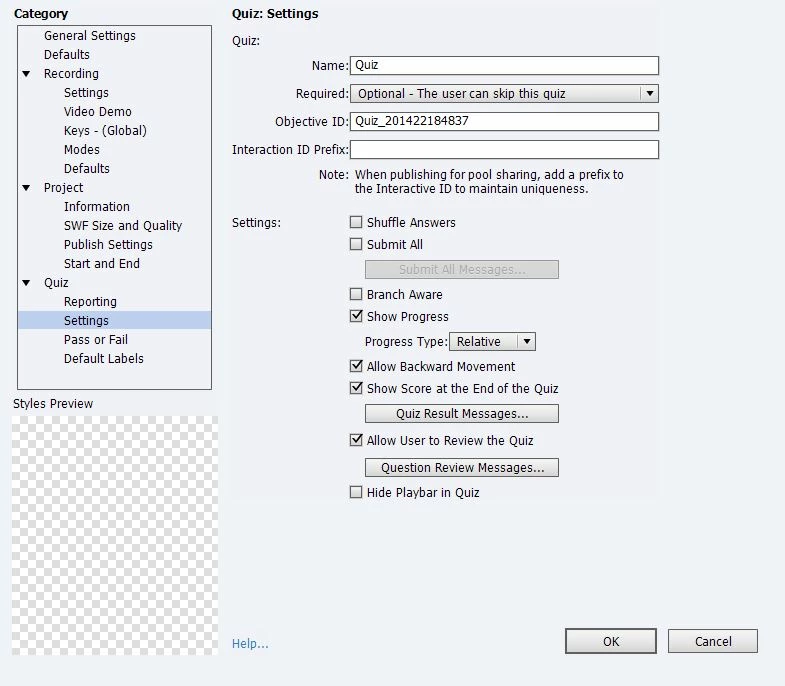
Nothing from there should cause the the playback options to change. 

Does any one have any suggestions or guidance?

Thank you

This topic has been closed for replies.
Correct answer Lilybiri

I have the branch aware unchecked - should this be checked?


No it should be unchecked. This is strange, because those are the two causes I know about.

1 reply

RajeevAdobe
Adobe Employee
Adobe Employee
March 24, 2014

Hello,

Welcome to Adobe forums.

Do you have pretest questions slides in your project ?

Whenever you insert Pretest slides, the skin editor will be disabled automatically for the whole project . And no way to turn it on. If you want a playbar, you'll have to use normal question slides for Pretest (with its consequences) or use custom question slides for pretest.

Regards,

Rajeev.

March 24, 2014

Thanks Rajeev!

I did not use the preset quiz slide. I used just the Questions slides option and created and modified the slide to my needs (mulptiple answer, multpile choice). The rest are using click boxes on screens set with a specific point value. Would that make any difference as well?

Message was edited by: corydavis2008

RajeevAdobe
Adobe Employee
Adobe Employee
March 24, 2014

Modifying the questions slides does not cause this problem.

Regards,

Rajeev.