muchelleb
Inspiring
January 4, 2018
Question

Captive Only Publishing Corrupt SCORM Files

  • January 4, 2018
  • 2 replies
  • 501 views

Hi,

Since about an hour ago, any file that I publish as a SCORM publishes as corrupt files, and my LMS won't accept it. (before that all was working fine)

At first I thought it was a problem with the LMS: then I tried uploading SCORM files that I had saved before this morning. They uploaded fine.

It's only files that I've published since an hour ago seem to be corrupting.

I've experimented with captivate files that have previously worked great in my LMS, and republished them using Adobe Captivate ten minutes ago. The files now publish as corrupt SCORM files that don't work in my LMS. (The old published versions of the file upload fine!)

I'm using Adobe Captivate 2017 and publishing with my normal settings - HTML5

Has anyone experienced this? Does anyone know what might be the issue?

Any help would be MUCH appreciated

This topic has been closed for replies.

2 replies

muchelleb
muchellebAuthor
Inspiring
January 9, 2018

So I've just received a response from my Learning Management System provider, and they're let me know that because these two files have an @ symbol in the name, they can't be uploaded in to the system. These files have always had the @ symbol as far as I can tell, and it's never been an issue before.

A call out to anyone who'll listen: Is this normal? Should an @ symbol be appearing?

Will my LMS need to make an except for this symbol?

Thanks so much for any help.

RodWard
Community Expert
Community Expert
January 9, 2018

I can confirm that in my own HTML5 published projects there are these same two files in the assets > htmlimages folder.

As far as I can see these are the ONLY files that contain an @ symbol in the filename. It appears as if there are two sets of images and the files with the @ symbol in the name are double the size of the same image without the symbol.

However, I have to say that I think whoever in Adobe that thought it was a good idea to do this made a huge mistake.  Including a special character like this in a filename is just ASKING for trouble because some systems will always see this symbol as indicating an email address.  I'm surprised it hasn't cause more issues before now.

I suggest you log a bug with Adobe using the bug reporting form on the Adobe Captivate Community website.

In the meantime you may need to approach your LMS provider to see if they indeed have the ability to work around this issue.  Other LMSs don't seem to have a problem with it, so maybe there's hope yours can also.

RodWard
Community Expert
Community Expert
January 4, 2018

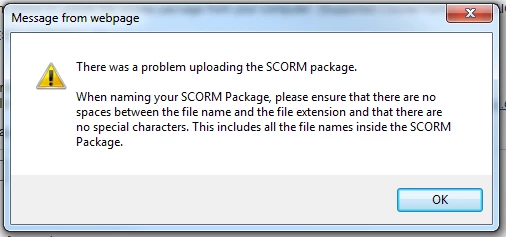
So does your SCORM package have any spaces or punctuation characters used in either the file name or the SCORM data?  That's what the error message is saying.

Alternatively, try uploading the same package to SCORM Cloud and see whether it works from that LMS.  Your current issue might be due to some overnight change that has taken place on your LMS server.

muchelleb
muchellebAuthor
Inspiring
January 4, 2018

No - I should have mentioned.

This error message appears whenever there's any issue with any SCORM file, no matter the issue. The file name had no spaces or special characters etc etc - the names were names I'd used before.

Okay - the eLearning seems to be working in SCORM cloud - I didn't even know that such a thing existed but that's a great tool!

It works in SCORM cloud, so hopefully it's an issue with my LMS - it just seems so odd that old captivate files upload fine but files that I published this morning don't...

Thanks for your help.

RodWard
Community Expert
Community Expert
January 4, 2018

If the older Captivate files were created with Captivate versions before Cp9 or with early dot.point versions of Cp9 then the HTML5 files would NOT have included JSON files.  Perhaps you should check to find out whether there has been a recent change or update to the LMS web server which could mean that JSON files are no longer enabled.