kenseyb65813140
Participant
April 6, 2016
Answered

Change a Graded slide to a Pretest slide after slide has been made

  • April 6, 2016
  • 1 reply
  • 478 views

Hi!

Before realizing there was a pretest setting, I had all my question slides set as "Graded"; however, I am learning through this forum that it is difficult (maybe impossible?) to insert two Graded quizzes into one project. When I go to change my Question slides to Pretest, the option is grayed out. Does this mean I have to recreate all my slides in order to change them to pretest? That would be incredibly inconvenient.

Thanks!
This topic has been closed for replies.
Correct answer Lilybiri

Another tip: open the Advanced Interaction panel while doing this (Project menu). You'll see all the scored objects there, and you'll see that all question slide scores are automatically added to the Total score.

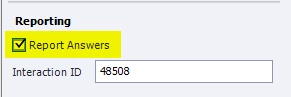
That panel is dynamically linked to the Properties and Quiz Properties panels. Choose a question that you want to turn in a non-reported version in that panel. Look in the Properties panel for the part 'Reporting' and uncheck the option Report (see screenshot, this one is reported):

You'll see immediately the result in Advanced Interaction, and the Total score will be decremented.

1 reply

Lilybiri
Legend
April 6, 2016

There is no direct way to change a normal question slide to a pretest slide. But is this what you need? Pretest slides have very strict rules:

  1. They have all to be in the beginning of the course, in sequence
  2. All navigation (playbar and TOC) will be disabled
  3. The result (score) of the pretest can only be used to make a decision based on a Pretest condition, mostly with branching as result.

Is this what you want? You can show the result of the Pretest, using the dedicated Pretest quizzing system variables, but they'll not be reported to a LMS. It is certainly not a way to have two graded quizzes in one file. Only the final quiz's results will be reported.

Do you know it is possible NOT to add the score of some question slides to the Total score that is reported? Maybe that is a better alternative, and would spare you the time to recreate the question slides.

kenseyb65813140
Participant
April 6, 2016

I did not know it was possible to only add the score of some questions! How do I do that? I believe that will save me a lot of time.

Thank you for your prompt and helpful response!

Lilybiri
LilybiriCorrect answer
Legend
April 6, 2016

Another tip: open the Advanced Interaction panel while doing this (Project menu). You'll see all the scored objects there, and you'll see that all question slide scores are automatically added to the Total score.

That panel is dynamically linked to the Properties and Quiz Properties panels. Choose a question that you want to turn in a non-reported version in that panel. Look in the Properties panel for the part 'Reporting' and uncheck the option Report (see screenshot, this one is reported):

You'll see immediately the result in Advanced Interaction, and the Total score will be decremented.