I have a bulleted list where one of the lines of text is a different color than the rest. This changes the bullet color to match the text. How do I make it so the bullet is black like the rest, but the text is green?
This topic is closed to new replies. Start a new post to keep the conversation going.
That is indeed what happens by default, if you change the color of a line in a bulletted list, the bullet will take on that color.
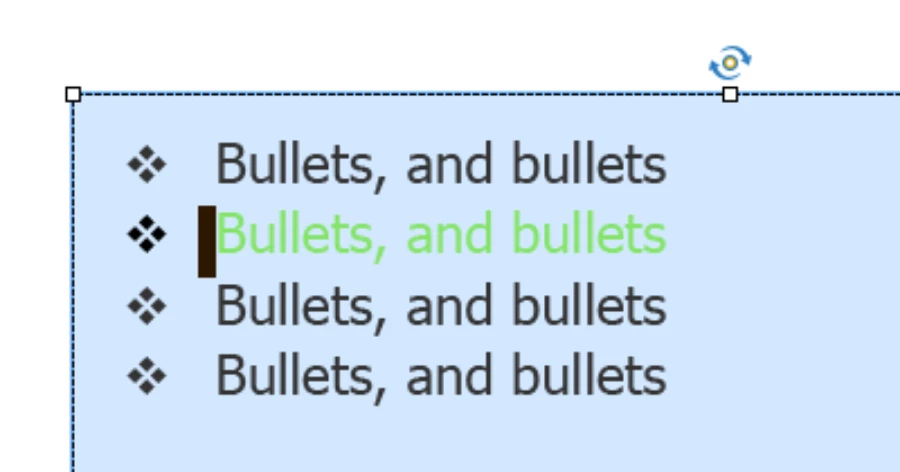
You want a tweak? Start each of the lines with a space (to make them look alike). For the green colored line, select that space and change its color back to black, the bullet will become black. Maybe this screenshot shows better what I mean:
That is indeed what happens by default, if you change the color of a line in a bulletted list, the bullet will take on that color.
You want a tweak? Start each of the lines with a space (to make them look alike). For the green colored line, select that space and change its color back to black, the bullet will become black. Maybe this screenshot shows better what I mean:
Thank you! That worked. So odd that there isn't a better way to "fix" it...like in MS when you select the space at the end of the line to change the bullet color. My left brain struggles with the extra space...even though I added it to all to align them. 🙂
Understand that you want an easier solution, but Captivate is not a word processor nor a desktop publisher. It has also a minimal set for audio editing, video editing, graphics editing (vector and bitmap), animations, simulations, not to forget its core business: interactivity for challenging and efficient eLearning tutorials. You cannot expect from a Swiss knife a combination of all the features of high professional tools bought individually.
I am very happy with its flexibility like for this rather simple hack.
Please can you mark that tip as being correct answer? I don't think there will be another possibility posted. Captivate is Theme-based and the object styles (it has no hierarchy in styles) are part of that theme.




 AdChoices