
Participant
June 22, 2017
Question

Change button label after answer is submitted.

  • June 22, 2017
  • 1 reply
  • 327 views

Hello,

I am creating my first project using Captivate 9.

For my question slides, the learner chooses an answer then clicks the "Submit" button to answer the question.
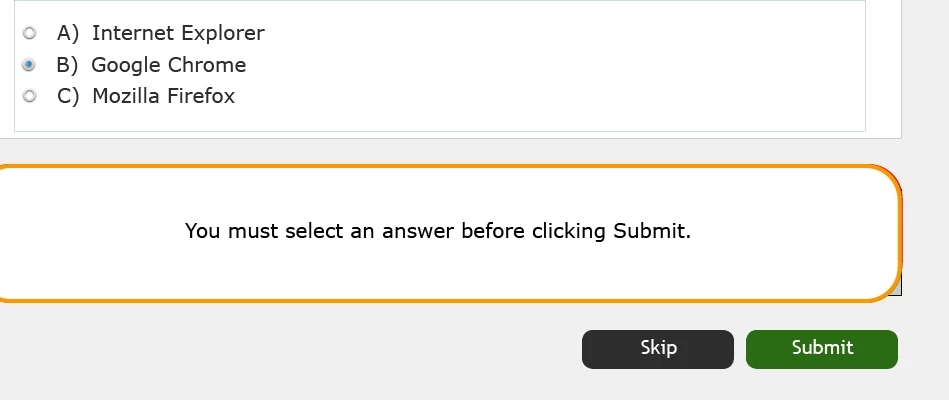
After clicking Submit they are informed whether they are correct or not.

At this point I would like to replace the label "Submit" with the label "Continue".

I would then like them to advance to the next slide by clicking a "Continue".
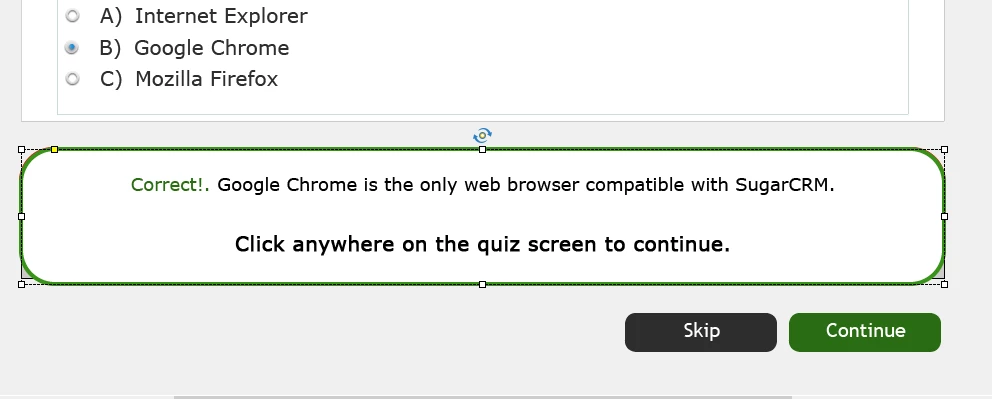
Is it possible to change the label on the "Submit" button to "Continue" after they submit an answer?

Thanks,

Frank

    This topic has been closed for replies.

    1 reply

    Lilybiri
    Legend
    June 23, 2017

    Captivate's quiz slides and score slide have very strict rules!

    The Submit process is a two-step process, triggered by that unique embedded Submit button:

    1. User clicks on Submit, the feedback messages appear. Only when the Retry message appears will the user be able to continue changing the answer and re-entering it. Both for Success and Last Attempt the feedback message indicates that the user has to click on the slide or press Y to continue
    2. After having clicked on the slide (or pressed Y) the actions defined (Success or Last Attempt) will be done. If you left it at the default Continue, the inactive part of the question slides will be visited by the playhead, after the last frame the user gets to the next quiz slide.

    The first step doesn't allow to 'do' something because it is not an event, only the second step allows to change something, but even with that action it is not possible to change the state for the Submit button because it is an embedded button. It has no ID, no separate timeline.

    It is possible to tweak, but it will need a lot of extra work. If you want really to do what your question tells, have a look at this older post describing a possible workaround, where you skip the first step, have to create custom captions, add an extra custom button (which has to be a shape button) etc:

    Question Question Slides in Captivate - Captivate blog

    Buttons on Question/Score Slides in Captivate 6? - Captivate blog