
Participant
July 24, 2019
Answered

Change closed captions settings by slide rather than by entire project

  • July 24, 2019
  • 1 reply
  • 372 views

Hi,

I'm using Captivate 9 and would like to know if it's possible to have different settings for closed captions on a slide by slide basis rather than just one setting for the entire project?

Thanks

Michael
    This topic has been closed for replies.
    Correct answer RodWard

    Yes it is.  But if I remember correctly, this functionality only came in with Captivate 2017.  So, you may need to consider updating your version to get it.

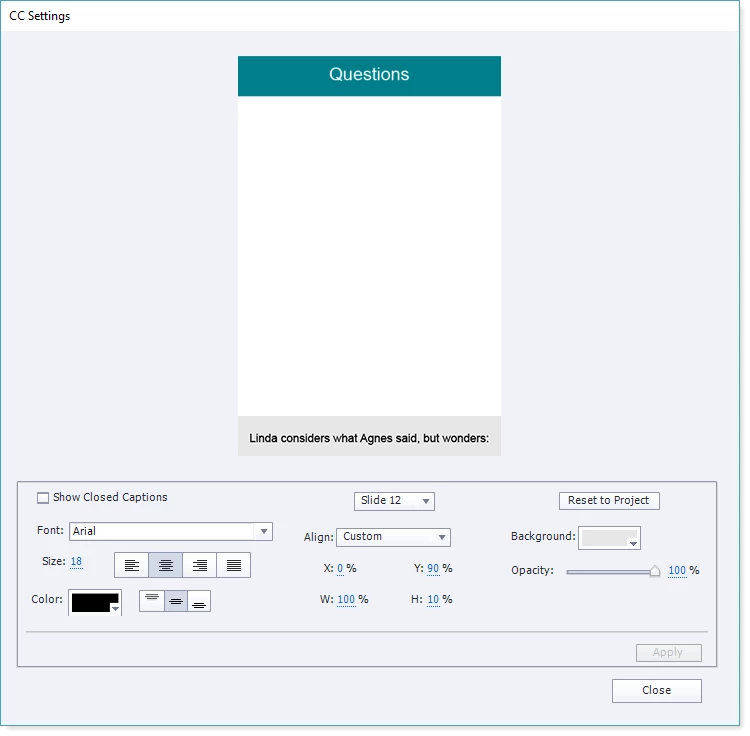
    This is what the Closed Captioning configuration settings screen looks like now.

    If you don't see something like this then you cannot have different CC settings per slide with your version.

    1 reply

    RodWard
    Community Expert
    RodWardCommunity ExpertCorrect answer
    Community Expert
    July 24, 2019

    Yes it is.  But if I remember correctly, this functionality only came in with Captivate 2017.  So, you may need to consider updating your version to get it.

    This is what the Closed Captioning configuration settings screen looks like now.

    If you don't see something like this then you cannot have different CC settings per slide with your version.

    Lilybiri
    Legend
    July 24, 2019

    Indeed, Rod, the new CC features appeared wit CP2017.