Question
Change the Color of TOC Scrollbar in Captivate 4?
I have created three Captivate Modules with Table of Contents and then one Aggregator file that includes all three three modules.
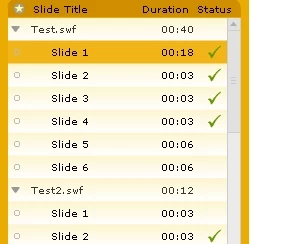
When the TOC is expanded, the scrollbar remains the original light gray.
I changed all color settings for the TOC but did not see an option to change the color of the scrollbar.
Does anyone know how to change the color of the scrollbar in the TOC?
Please Ignore the funky colors . . . but much appreciation if you have an answer!
 AdChoices