Participating Frequently
January 17, 2012
Answered

Change the ways objects are arranged on a quiz slide

  • January 17, 2012
  • 2 replies
  • 525 views

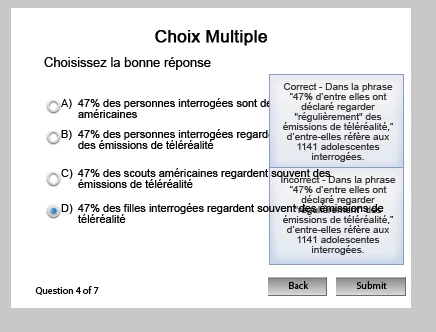
Right now the Incorrect feedback appears behind one of the possible answers and is not legible. Somehow the correct feedback appears on top. How can I bring the Incorrect feedback to the front. The option to arrange object is greyed out...Thanks!

E.
This topic has been closed for replies.
Correct answer Lilybiri

Hello,

Did you preview the file (preferably in browser)? Is it still behind the answer then? Do find this strange, normally the captions are on top.

Lilybiri

2 replies

RodWard
Community Expert
Community Expert
January 18, 2012

Use the Properties to remove the Failure captions (copy the text in them first to some other document so you can paste it back in) and then add them back.  I think you'll find they come back on top of everything else.

Lilybiri
LilybiriCorrect answer
Legend
January 17, 2012

Hello,

Did you preview the file (preferably in browser)? Is it still behind the answer then? Do find this strange, normally the captions are on top.

Lilybiri

Participating Frequently
January 24, 2012

When i preview it in the browser, it all loks good, so thanks!