


Inspiring
April 13, 2023
Answered

Change value of variable at a certain time on the timeline

  • April 13, 2023
  • 2 replies
  • 1111 views

Hi
I have to buttons inside my menu that when pressed show a submenu and pause the video. When the button for closing the submenu are pressed the video continue.
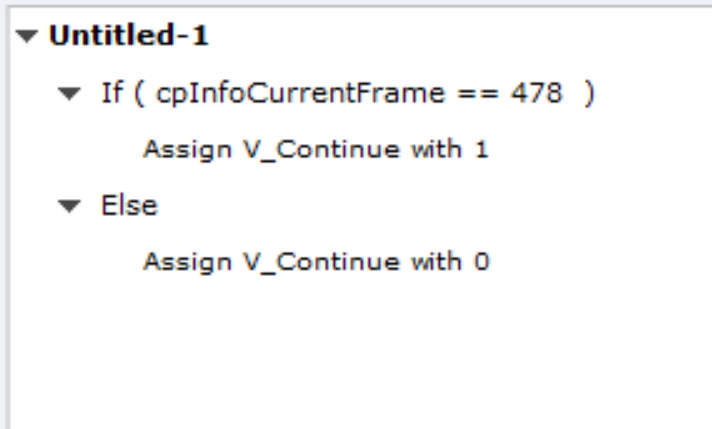
A bit out on the timeline / the video I have several interactive elements that the user needs to take a stand on. Everything is custom made. When these interactive elements are presented I would like to prevent the video to keep playing if the user are navigating the menu. I was thinking of using a variable that change on a specifik frame using a onload script at the slide as showed below.
 

    This topic has been closed for replies.
    Correct answer mysk83

    Figured it out. I could just put the else/if script on the buttons. That if the frame is 478 the button will not be able to press 🙂

    2 replies

    Lilybiri
    Legend
    April 13, 2023

    Of course such an action cannot be functional because cpInfoCurrentFrame is the frame at which the action is triggered, and since you use the On Enter event, it will be the first frame of the slide.

    Is it possible to post a screenshot of the Timeline? And explain exactly what you want to achieve, because there may be a better solution for your goal than a value change for a variable. I need the timeline to know if you have other interactive objects on that slide. Is the exact time where you need that change fixed or is it variable? 

    mysk83AuthorCorrect answer
    Inspiring
    April 13, 2023

    Figured it out. I could just put the else/if script on the buttons. That if the frame is 478 the button will not be able to press 🙂

    Lilybiri
    Legend
    April 13, 2023

    I just posted an answer, and I don't understand why your answer will be correct? What are those buttons (which I would have seen on the timeline)? Are you aware that the Frame index is for the whole project?  Sorry, but this is a public forum, and other users will be as confused as I am by your question and your 'correct' answer. You use micro-navigation variables but I fear that you are not realizing the impact and may end up with a slight out of synch problem.

    mysk83Author
    Inspiring
    April 13, 2023

    I explained my problem a bit more in-depth now in my first post. That will suit the solution I came up with. Hopefully that will be a bit more understanding. If not, and Im not aloud to mark my own solution to the problem as the correct answer I apologize and ask the admin to remove my post.